Category Archives: Feldman Project

Tom DeVito 1.31.2012

Start: 10:00

  • The project was set to include libraries from the original directory it was in.  Changed it so it would use the folder within the projects root.
  • Fixed a problem where items larger then 128b, were not breaking into smaller packets properly.
  • Added checks to make sure the larger buffer wasn’t too big
  • Add more checks for null pointers so the program doesn’t crash

end: 6:30

Phil 1.31.12

8:30 – 4:00 FP

  • Good math library if I need it later: http://cmldev.net
  • Cleaning up the collision detection
  • And collisions work with multi-axis roatations. Cool.
  • Starting the OpenGL 4.0 Shading Language Cookbook.
    • Immediate mode has been deprecated! Going to get the GLEW (openGL Extension Wrangler) from sourceforge
    • Wow. No matrix mode either. Getting the GLM library
    • Code download is here: http://www.packtpub.com/code_download/7658
    • Hmm. I need to understand how the camera is setup in OGL 4.0.

Tom DeVito 1.30.2012

Start: 12:00

#FUTURE: Inventory of what is needed for PCB of each finger module:

  1. 10 pin dip for rheostates
  2. two 8 pin dip for amplifiers
  3. voltage divider circuit for sensors(may or may not make sense to have this on the same board)
  4. Power in and ground for 5 volt power supply
  5. Signal in and shared ground for arduino serial input(I2C BUS)
  6. Audio in from Midi Shields
  7. Audio out to go to larger amplifier
  8. rgeostat needs two pins to have the option of being pulled high or low for addressing purposes
  9. Rheostat also has two voltage dividers,  one for each amplifier
  10. Amplifiers need a resistor on the rheostat signal line, capacitors on the power in pin, decoupling capacitors on the signal in and audio out lines.

I think thats everything for that

ComUtil

  • Fixed a problem with the toString method, it now is printing out the correct information
  • large data seems to be passing properly, Started tailoring the test to work with the data dictionary instead of arbitrary data that I set up.

End: 6:00

Phil 1.30.12

8:30 – 5:30 FP

  • Adding environment methods that will coordinate the interactions of the objects.
  • Cleaning up Arvo’s so that only 3D collisions between solid objects are calculated, with a resulting unit penetration value.
  • Collision detection and response are now working!
  • Adding a few more cubes to collide with. Then work on global to local mapping so that I can have the cubes at arbitrary angles.
    • Added the cubes, now I need to clear and sum the collision forces each time through. Done.
    • After spending the entire afternoon unrotating objects in my head, I got the projections onto the object in it’s coordinate frame working. So bounding boxes work at any arbitrary angle. Whee!

Tom DeVito 1.27.2012

Start: 11:00

  • I realized late last night, that using Visual Micro, the arduino might be able to use libraries files.  This can probably also be done manually with a .make file.
  • I was able to pass a string both directions on first pass
  • It was switching states too fast.
  • Slowed down the process with one second delays to make debugging easier
  • It wasn’t switching back to ready on the end of a recieve.

End: 6:00

Phil 1.27.12

8:00 – 10:30 FP

  • Working on collision detection. It just needs to be convex hull. At this point I’m thinking of doing the following:
    • For each polygon
    • calculate the shortest distance to the plane
    • If the square of the distance is less than the collision radius
      • See if the collision point is within the polygon (project the plane onto X, Y or Z, if it crosses an odd number of line segments, it’s outside – for convex polygons we can stop at one crossing)
      • If the distance from the “center” (average of all points) to the collision point on the plane is less than the distance from the “center” to the test point, then the collision is happening outside the hull, and the force can be calculated based on the difference between the collision radius and the surface. Otherwise, it’s within the hull, and the force is based on the collision radius + the distance from the polygon.
  • Well this is convenient – The Game Programming Wiki
  • Looks like we can use Arvo’s algorithm. Going to see how this works. Discovered Arvo here at Gamasutra.
  • Graphics Gems code repository
  • www.geometrictools.com: source code for real-time computer graphics and physics, mathematics, geometry, numerical analysis, and image analysis
  • http://www.realtimerendering.com/intersections.html

10:30 – 12:30 Interview

  • Went well. The work would be entirely on site. Ah well.

1:30 – 5:00 – FP

  • Got Arvo’s in. I can clean it up so that the collision test is only for solid shapes, which will allow me to get penetration values out of the collision. There was one tricky bit – I had to get the viewpoint matrix multiplies out of the collision calculations. So now there is a render() pass which draws, and a calculateCollisionPoints() that is called at some other time without any glBegin()/glEnd() blocks, and starting with an Identity matrix. I then pull the result of all the calculations off the matrix stack and save for the collision calculations. This does need to be cleaned up, but it’s not bad.
  • Collisions!

Tom DeVito 1.26.2011

Start: 10:00

  • Fixed some issues where the states were changing before they needed to
  • Fixed a problem with the arduino send method
  • Fixed a problem with the arduino receive method
  • Handshaking seems to be working fine, data is not coming through properly though.

End: 6:00

Got distracted by Server stuff for a while.  I will hold off on migrating data til next week, when I am done with this communication stuff.

Phil 1.26.12

8:30 – 5:00 FP

  • Wire up the force sliders
    • Index finger is done
    • Thumb finger is done
    • Ring  finger is done
    • Middle finger is done
    • Pinky finger is done
  • Added text within the 3D environment, partially to show Dong how it’s done, but also because it could be quite useful. It’s in the DrawableObject base class.
  • Add collision detection
  • Add force output display (Small GL windows, drawing only 2D?, slider?)

Tom DeVito 1.25.2012

Start: 10:00

  • Made it so reciveData returns boolean.  This way the state will only change if it receives successfully.
  • After lots of troubleshooting, basic handshaking messages seem to be transferring properly.
  • Changed test to be able to test sending data.

End: 6:00

Phil 1.25.12

8:30 – 5:30  FP

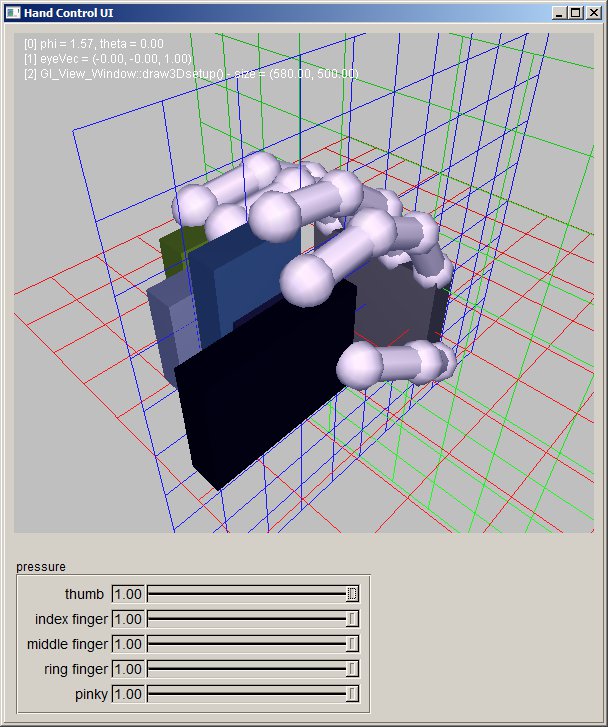
  • More on the HandControlUi and RightHand proper.
  • Added a clock to calculate elapsed time between frames for physically-based modeling.
  • Got the basics of the hand working, but I need to rework the eyepoint/model control. Adding a popup menu to select the mode.
  • This is a great source for FLTK coding examples (Erco’s FLTK Cheat Page)
  • Done with the popup menu
  • Adding the matrix analysis to get the position  of the fingertips. Done for one finger. Need to add methods to store and access all the position information. May need orientation. If so then I could subtract the position from the current matrix, then multiply a vector by the resulting matrix.

Tom DeVito 1.24.2011

Start: 9:45

  • Finished up changes to comutil and commgr
  • Set up testing envioronment
  • Going to send string messages across and print them to the console, after testing the more basic functions.
  • Added some checks for null pointers so it doesn’t crash.

End: 6:00

Phil 1.24.12

8:30 – 2:30

  • Well, I was hoping to use the MODELVIEW_Matrix to determine the orientation vector of the camera, but no luck. Time for classical spherical coordinate transforms. Transposing Y and Z, since OpenGl likes to have Y as the up vector.
    • phi = angle from vertical, theta = angle from x axis
    • z = cos(theta)*sin(phi)
    • x = -sin(theta)*sin(phi)
    • y = cos(theta)
    • And that is now working. Note that we had to multiply the x component of the view vector by -1.
  • Oooo – new shader book: http://www.packtpub.com/opengl-4-0-shading-language-cookbook/book
  • Started on the HandControlUi fltk class.

Tom DeVito 1.23.2012

Start: 10:30

  • Working on changes to ComUtil.  Since the basic communication should work independent of all the other stuff sent over the wire, the state and size of the potential incoming packet will be transferred in the smallest way possible.
  • Made the following changes to ComMgr:
  1. Made send and recieve as simple as possible so ComUtil does all the heavy lifting
  2. Took out all buffers at this level.  The pointer to the buffer is passed into the methods
  • Changes to ComUtil:
  1. After trying to figure out how to do this and writing and rewriting the same part, I decided to model this class after the typical controller.
  2. This class does not inherit from controller because I wanted it to be lighter weight
  3. This class also runs in Master and Slave mode.  In the case of this program the PC will always be flagged master and the Arduino will be the slave.  The master controls the uid incrementing and the slave always echos.
  4. A large buffer will be broken into smaller packets
  5. decided since the buffer was a static size, it made sense to just send the packets in a way to match that size.  Its currently send 4 packets of 128 bytes regardless of if its full or not.  I can change this later if there are speed issues.
  • Finishing up ComMgr(Arduino)
  • Designated some flags for blog entries to make finding important information easier.

#IMPROVE:  ComMgr(PC) needs a non-blocking receive

#IMPROVE:  Send and recieve expect the whole 512 buffer split into 4 128byte parts.  This can be done more efficiently if needed.

Phil 1.23.12

8:30 – 5:30 FP

  • Fixing up a few things with eyepoint control, then adding the hand
  • Got sidetracked about adding text overlay capability. Also, to truly make the eyepoint controls work, the eye vector needs to be transformed by the view matrix rotational component
  • Big lesson of the day – if you declare a static variable in the header file, you must reference it outside the methods in the .cpp file. But Dprint() is now working as an overlay!
  • Filled out paperwork for Clif’s project, looks like there is progress.

Tom DeVito 1.20.2012

Start: 9:00

  • AVR studio is not really made for the arduino.  Supposedly you can drop the compiled .elf file into the debugger but I haven’t found where this is.
  • Fixed the problem where the arduino was not responding to the first packet the PC sent
  • Fixed the problems that were causing the data dictionary to crash on send and import if no data was there.
  • While doing the above I found where the .elf file is:  C:UsersThomasAppDataLocalVMicroArduinoBuildsDataCommunicationTestmega2560
  • User name and project name are case dependent of course.
  • Still not exactly sure what to do with the file.  Most forums I read just say drop it in the debugger….
  • Added a base class for the arduino sides communication.  This is so ComUtil can be the same on both sides despite having completely different base methods.  On the PC ComMgr serves this purpose.
  • Changing ComUtil to have states and send messages to ensure sychronization.  Once this is done I’ll try to figure out where the debugger thing is.

End: 5:00