Phil 5.24.17

7:00 – 8:30 Research

  • Working on the new version of the HCIC  boaster
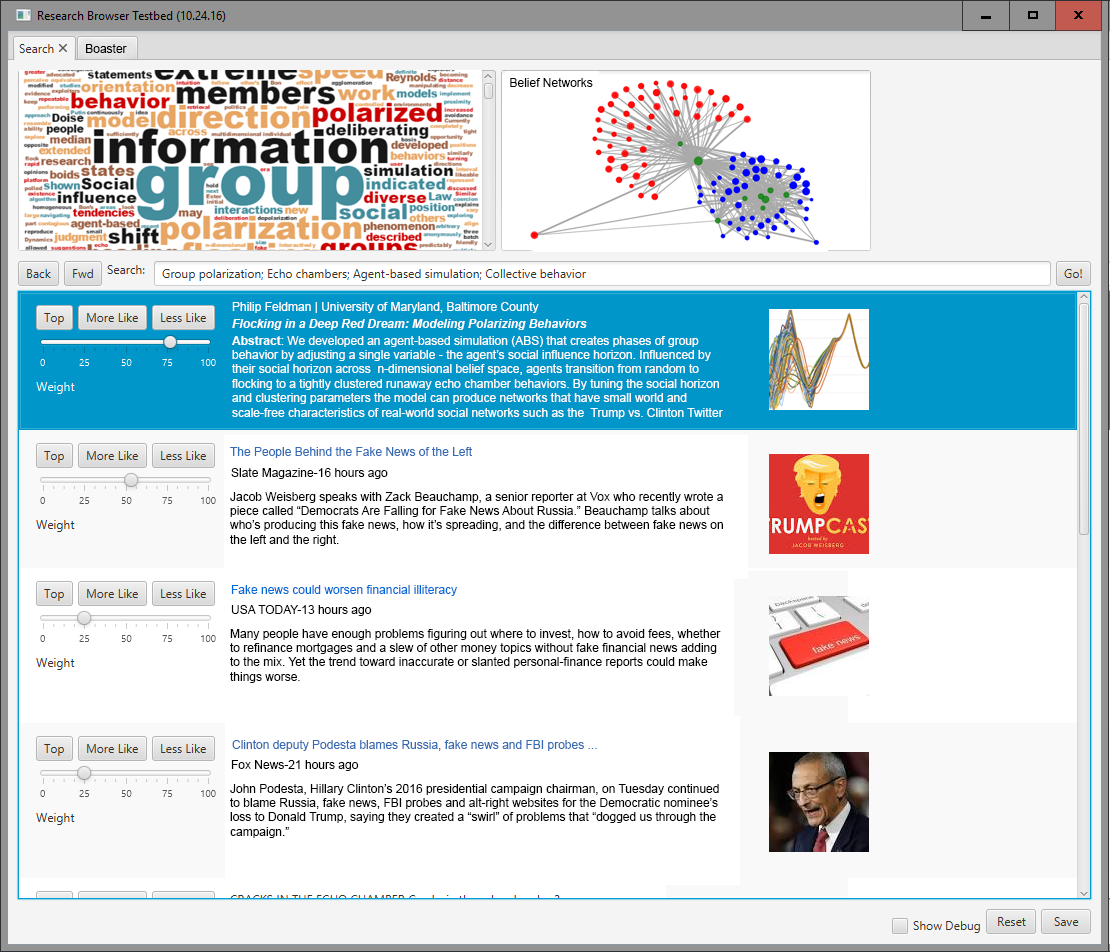
  • Abstract: AbstractCover Add a picture of a network next to each item that reflects the polarization level. Maybe gray out the non-abstract bits.

9:00 – 5:30 BRC

Phil 5.23.18

7:00 – 8:00 Research

  • Reworking the poster using the research browser and found this:
    • Emergence of metapopulations and echo chambers in mobile agents. Just from reading the abstract, their model is more complex, but similar results? Multi-agent models often describe populations segregated either in the physical space, i.e. subdivided in metapopulations, or in the ecology of opinions, i.e. partitioned in echo chambers. Here we show how both kinds of segregation can emerge from the interplay between homophily and social influence in a simple model of mobile agents endowed with a continuous opinion variable. In the model, physical proximity determines a progressive convergence of opinions but differing opinions result in agents moving away from each others. This feedback between mobility and social dynamics determines the onset of a stable dynamical metapopulation scenario where physically separated groups of like-minded individuals interact with each other through the exchange of agents. The further introduction of confirmation bias in social interactions, defined as the tendency of an individual to favor opinions that match his own, leads to the emergence of echo chambers where different opinions coexist also within the same group. We believe that the model may be of interest to researchers investigating the origin of segregation in the offline and online world.

8:30 – 5:00 BRC

  • Spent most of the day getting the development environment up and running on all the code.
  • Built a ‘dev file’ that fits on a thumb drive and contains versions of all the dev tools, SDKs and libraries. Was hampered by very slow internet. The workstation should go quicker as a result, though
  • Meeting with Theresa, Bob, Shawn, Aaron and Ellis. I think we laid out the dev process and it’s associated constraints. Shawn will go get us data to characterize, and Eli will get some ICU(?) data containing ICD codes.

Phil 5.18.17

7:00 – 8:00 Research

8:30 – 3:45 BRC

  • Still getting pushback on workstation. Ordered?
  • Still no Jira connectivity
  • Got a phone!
  • Cleaning up and documenting code

Phil 5.17.17

7:00 – 8:00 Research

8:30 – 4:30 BRC

  • Meetings. All. Day. Long.
  • Finished transferring Aaron’s ppt to LaTex. Looks pretty good, and an excellent first draft
    • We need to publish as a baseline to reference for our methods and choices. If it makes it through the review process, then we can point to it when we’re called out like in this morning’s review

Phil 5.16.17

7:00 – 8:00 Research

  • Never made it to Fika yesterday. Worked a solid 13.5 hours. Artificial deadlines are pretty dumb.
  • Continuing with registration paperwork and other loose ends
    • HCIC travel (May 19), poster (June 2) – Attempting to register. Account created
      • Registered!
      • Travel email sent. Sat June 24 – Sat Jul 1
    • PhD Review (May 26) – started. Sure hope It incrementally saves…
      • Nope – starting over, offline. Making progress…

9:00 – 5:00 BRC

  • Sprint review. Went well, I think
  • Working on turning the PPT into a document

5.15.17

Well, the weekend ended on a sad, down note. Having problems getting motivated.

7:00 – 8:00 Research

  • Filled out CI 2017 form
  • Started HCIC registration
  • Started PhD review

8:30 – 8:00PM BRC

  • Run clustering on t-SNE again with Bob’s settings. It’s…. OK. We think that MDS and LLE are better for now, but there are almost certainly hyper parameter tweaking that we can do.
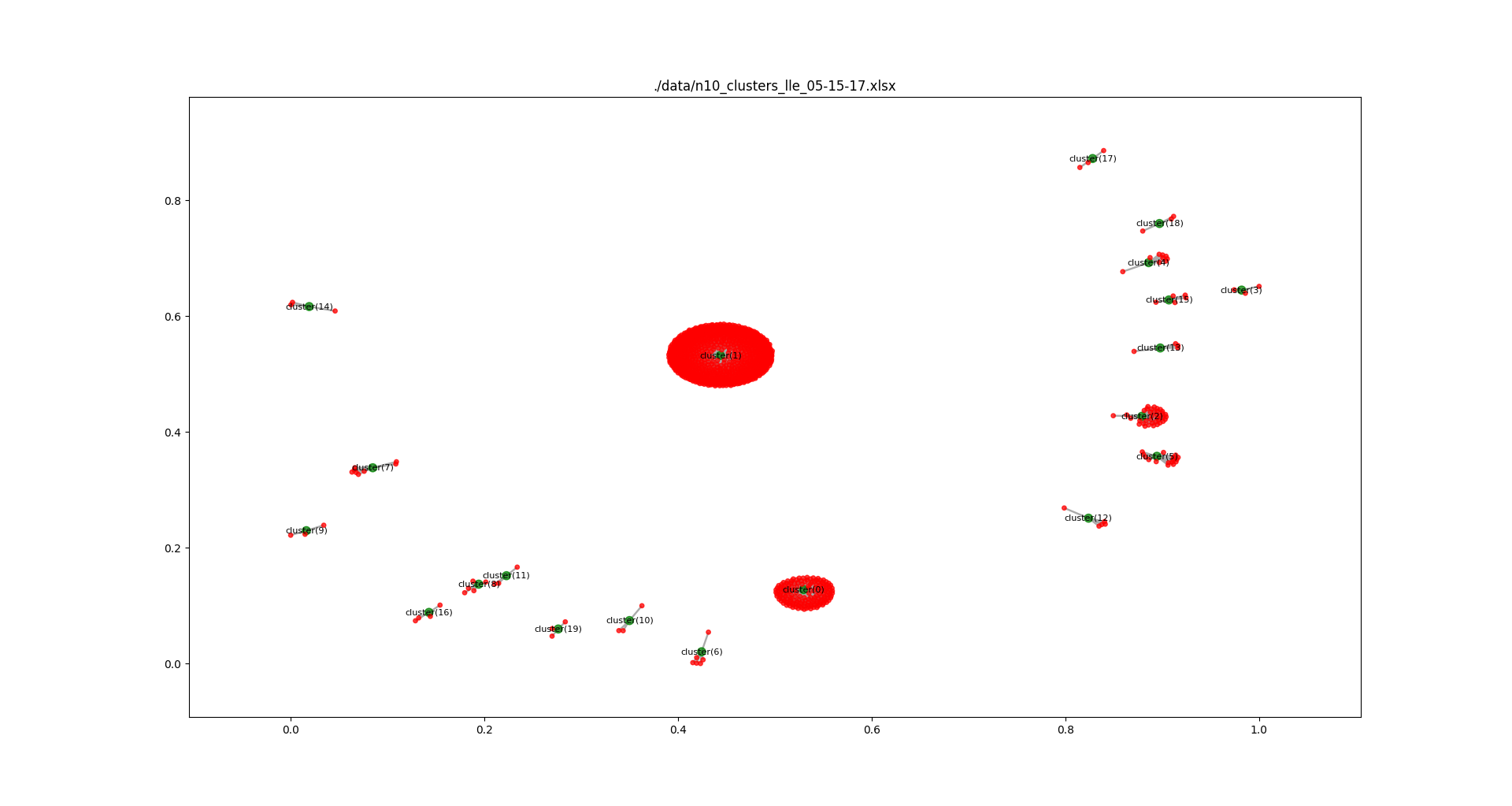
  • Here’s n example of actual data with lots of error between runs: n5_clusters_lle_05-15-17but by adjusting the hyperparameter ‘neighbors’ from 5 (above) to 10 (below), we get a completely different result: n10_clusters_lle_05-15-17Here, you can see that no cluster shared its nodes with any other cluster. That’s what we want. Stable, but with good granularity.
  • We can play some games on the clustering by seeing what happens when we remove some columns from our data. Here’s the above data with gender included and excluded: gender_and_nogenderIt’s possible to see that several items that were in cluster (0) distribute out when gender don’t override associated clusters.
  • Had a weird issue where LLE clustering on our test data that worked with neighbors = 10, now needs neighbors > 12 to work. Not sure why that’s happening.
  • Need to write up a report generator that does the following:  For each cluster in the set that we are comparing:

    size
    stable/total
    list of stable

Phil 5.14.17

Tasks:

  • Collective Intelligence details (May 18) – Done
  • HCIC travel (May 19), poster (June 2) – Attempting to register. Account created
  • PhD Review (May 26) – started. Sure hope It incrementally saves…
  • CHIIR 2018
    • 1 October 2017 *- Full papers and Perspectives papers due
    • 22 October 2017* – Short papers, Demos, Workshops and Tutorials proposals due
    • 1 November 2017* – Doctoral Consortium applications due
    • 15 December 2017* – Notification of acceptance

Phil 5.12.17

7:00 – 8:00 Research

  • I searched for better Electome images (unannotated) and found a few. They are on the previous post. I’ll seriously start to work on the poster this weekend.
  • Cleaned up some code, and made the writing of an image file optional. Still figuring out the best way to do helper classes in Python
  • Starting to learn the analytic capabilities of Networkx, which is its core as I understand. Going to start to characterize the networks and compare against stored sets (like the Karate Club) that is in the library
  • List of algorithms

8:30 – 4:30 BRC

  • Working on cluster member sequence visualization.
    • Needed to make unclustered user configurable
    • Needed to make timeline sequence, where OPEN and CLOSED states are enabled, user configurable
  • Results! LLE looks to be the best by far:

Phil 5.11.17

7:00 – 8:00, 4:00-7:00 Research

  • Guest lecture for CSCW class! Notes!
    • And it went well. Fun, actually.
  • Working on making the line width based on the time spent in the cluster, the cluster size a function of its lifespan, and the agent size, a function of time spent in a cluster
    • While working on the last part, I realized that I was including ‘unclustered’ (-1) as a cluster. This made all the agents the same size, and also messed up the cluster collating, since unclustered can be the majority in some circumstances. Fixing this made everything much better: figure_1so now I need to rerun all the variations. Done! Rough boaster poster:HCIC Boaster 1xcf
  • Found better Electome images. More project info here and hereherooverviewwebsite-png-1400x1400image2-png-1400x1400

9:00 – 3:00 BRC

  • Finished temporal coherence. Now we can compare across multiple cluster attempts. Tomorrow I’ll set up the cluster_optomizer to make multiple runs and produce an Excel file containing columns of cluster attempts

Phil 5.10.17

7:00 – 8:00

  • Systematic exploration of unsupervised methods for mapping behavior
  • Thinking about the stories I can tell with the GP sim.
    • Start together with same settings.
    • Disconnect
    • Slide exploit to max
  • Need to download blog entries
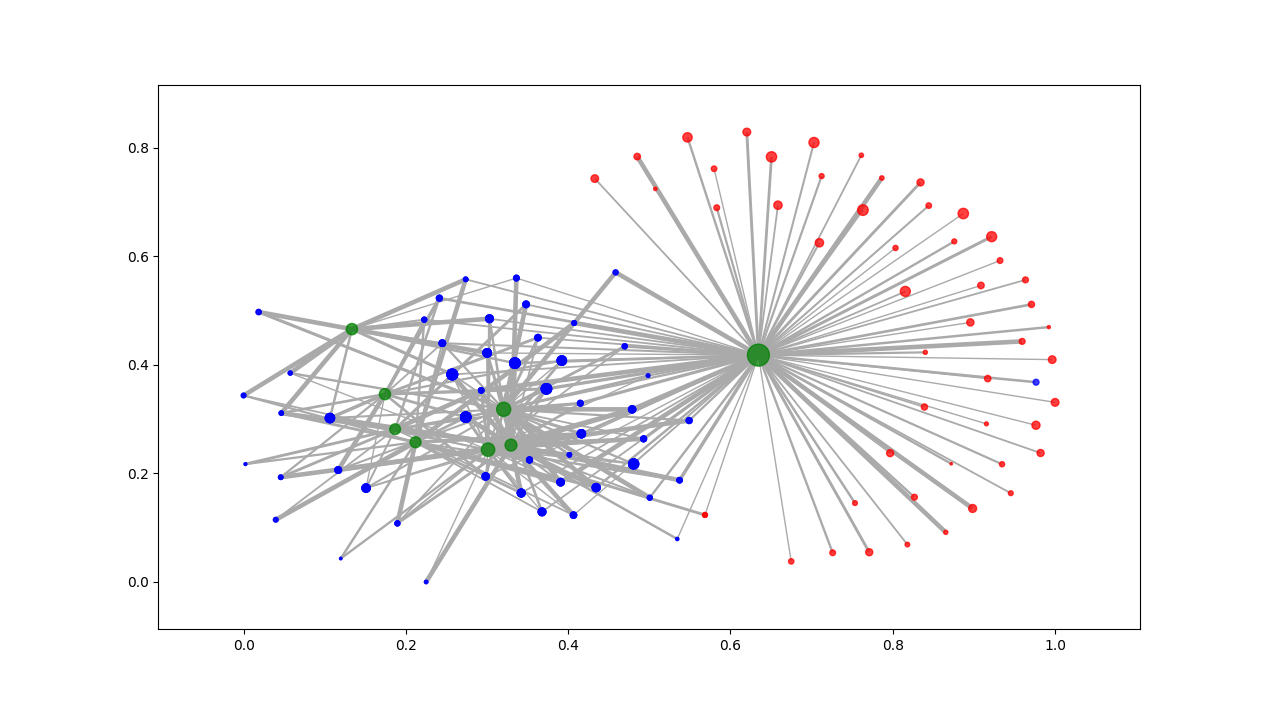
  • Working on graphing. Success!!!!! figure_1Now I need to discriminate agents from clusters, and exploit from explore. But this shows polarized vs. diverse clustering. I’m pretty sure I can get all kinds of statistics out of this too!
  • Better version. Ran all the permutations:
  • Explore_16_Exploit_32_04_14_17-08_38_48explore_1.6_exploit_3.2_ran 04_14_17-08_38_48. Green are clusters, Red are Exploit, Blue are Explore
  • Need to make the line width based on the time spent in the cluster, and the cluster size a function of its lifespan

9:00 – 5:00 BRC

  • Working on showing where the data broke. Looks like Talend
  • For future referrence, How to turn a dict of rows into a DataFrame and then how to access all the parts:
    import pandas as pd
    
    d1 = {'one':1.1, 'two':2.1, 'three':3.1}
    d2 = {'one':1.2, 'three':3.2}
    d3 = {'one':1.3, 'two':2.3, 'three':3.3}
    rows = {'row1':d1, 'row2':d2}
    rows['row3'] = d3
    df = pd.DataFrame(rows)
    df = df.transpose()
    print(df)
    
    for index, row in df.iterrows():
        print(index)
        for key, val in row.iteritems():
            print("{0}:{1}".format(key, val))
  • Helped Aaron with the writeups
  • And it turns out that all the work I did “could be done in an hour”. So back to clustering and AI work. If there is a problem with the data, I know that it works with the test data. Others can figure out where the problem is, since they can handle it so quickly.

Phil 5.9.17

7:00 – 8:00 Research

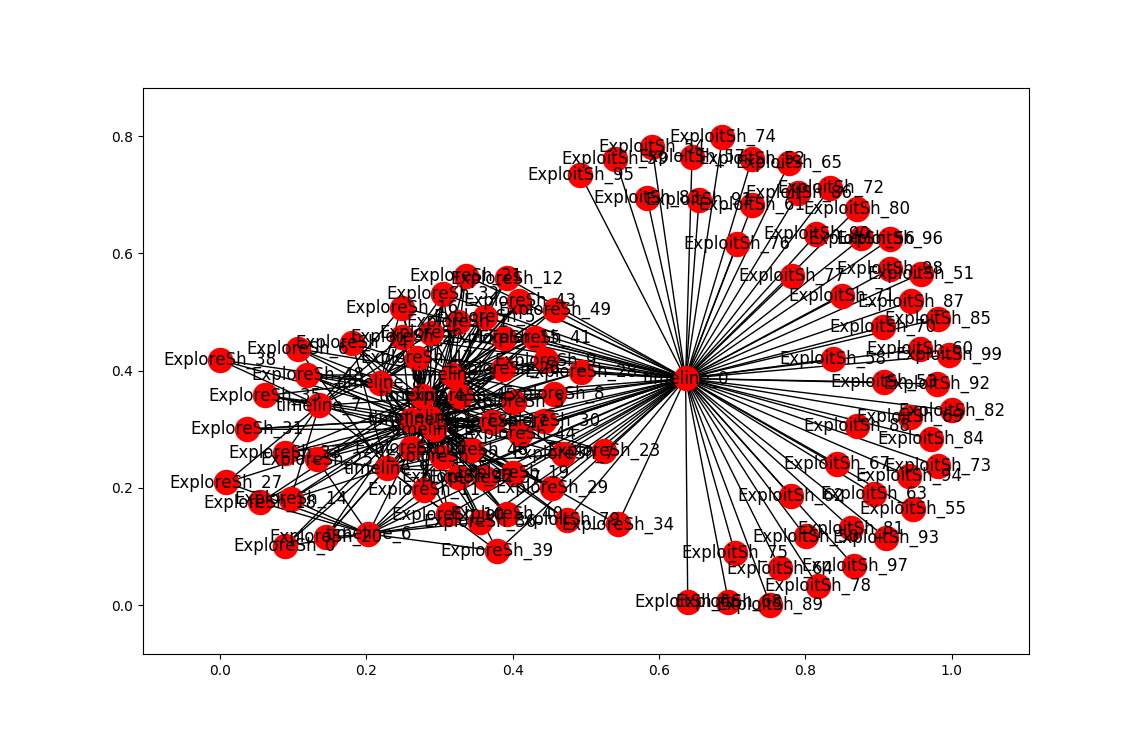
  • More clustering. Here’s the list of agents by clusters. An OPEN state means that the simulation finished with agents in the cluster. Num_entries is: the lifetime of the cluster. For these runs, the max is 200. Id is the ‘name’ of the cluster. Tomorrow, I’ll try to get this drawn using networkx.
    timeline[0]:
    Id = cluster_0
    State = ClusterState.OPEN
    Num entries = 200
    {'ExploitSh_52', 'ExploreSh_43', 'ExploitSh_56', 'ExploreSh_2', 'ExploreSh_5', 'ExploitSh_73', 'ExploitSh_95', 'ExploreSh_19', 'ExploreSh_4', 'ExploitSh_87', 'ExploitSh_76', 'ExploreSh_3', 'ExploitSh_93', 'ExploreSh_32', 'ExploreSh_41', 'ExploreSh_17', 'ExploitSh_88', 'ExploitSh_77', 'ExploreSh_39', 'ExploitSh_85', 'ExploreSh_40', 'ExploitSh_64', 'ExploreSh_34', 'ExploreSh_22', 'ExploitSh_99', 'ExploreSh_1', 'ExploitSh_97', 'ExploitSh_69', 'ExploreSh_29', 'ExploitSh_58', 'ExploitSh_62', 'ExploreSh_23', 'ExploreSh_36', 'ExploreSh_11', 'ExploitSh_80', 'ExploitSh_82', 'ExploreSh_21', 'ExploitSh_75', 'ExploitSh_72', 'ExploitSh_89', 'ExploitSh_86', 'ExploreSh_37', 'ExploitSh_84', 'ExploitSh_81', 'ExploreSh_15', 'ExploitSh_51', 'ExploreSh_44', 'ExploitSh_83', 'ExploitSh_94', 'ExploreSh_16', 'ExploitSh_53', 'ExploitSh_67', 'ExploitSh_74', 'ExploreSh_45', 'ExploreSh_26', 'ExploreSh_12', 'ExploreSh_13', 'ExploitSh_92', 'ExploreSh_9', 'ExploreSh_28', 'ExploitSh_50', 'ExploreSh_8', 'ExploreSh_30', 'ExploreSh_49', 'ExploitSh_59', 'ExploitSh_57', 'ExploreSh_42', 'ExploitSh_65', 'ExploitSh_54', 'ExploitSh_61', 'ExploitSh_66', 'ExploitSh_55', 'ExploitSh_78', 'ExploitSh_68', 'ExploitSh_79', 'ExploitSh_91', 'ExploitSh_71', 'ExploreSh_7', 'ExploitSh_98', 'ExploitSh_60', 'ExploitSh_70', 'ExploreSh_10', 'ExploitSh_90', 'ExploreSh_46', 'ExploitSh_96', 'ExploreSh_47', 'ExploitSh_63'}
    
    timeline[1]:
    Id = cluster_1
    State = ClusterState.OPEN
    Num entries = 200
    {'ExploreSh_25', 'ExploreSh_6', 'ExploreSh_38', 'ExploreSh_43', 'ExploreSh_49', 'ExploreSh_1', 'ExploreSh_2', 'ExploreSh_20', 'ExploreSh_33', 'ExploreSh_48', 'ExploreSh_5', 'ExploreSh_29', 'ExploreSh_15', 'ExploreSh_42', 'ExploreSh_24', 'ExploreSh_19', 'ExploreSh_4', 'ExploreSh_44', 'ExploreSh_16', 'ExploreSh_23', 'ExploreSh_36', 'ExploreSh_11', 'ExploreSh_3', 'ExploreSh_27', 'ExploreSh_35', 'ExploreSh_32', 'ExploreSh_17', 'ExploreSh_26', 'ExploreSh_21', 'ExploreSh_12', 'ExploreSh_18', 'ExploreSh_45', 'ExploreSh_41', 'ExploitSh_79', 'ExploreSh_13', 'ExploreSh_0', 'ExploreSh_39', 'ExploreSh_7', 'ExploreSh_9', 'ExploreSh_28', 'ExploreSh_40', 'ExploreSh_31', 'ExploreSh_10', 'ExploreSh_46', 'ExploreSh_37', 'ExploreSh_14', 'ExploreSh_47', 'ExploreSh_8', 'ExploreSh_30', 'ExploreSh_34', 'ExploreSh_22'}
    
    timeline[2]:
    Id = cluster_2
    State = ClusterState.CLOSED
    Num entries = 56
    {'ExploreSh_25', 'ExploreSh_1', 'ExploreSh_33', 'ExploreSh_29', 'ExploreSh_5', 'ExploreSh_48', 'ExploreSh_15', 'ExploreSh_19', 'ExploreSh_36', 'ExploreSh_3', 'ExploreSh_11', 'ExploreSh_35', 'ExploreSh_45', 'ExploreSh_17', 'ExploreSh_26', 'ExploreSh_41', 'ExploitSh_79', 'ExploreSh_13', 'ExploreSh_9', 'ExploreSh_40', 'ExploreSh_31', 'ExploreSh_37', 'ExploreSh_47', 'ExploreSh_30', 'ExploreSh_22'}
    
    timeline[3]:
    Id = cluster_3
    State = ClusterState.CLOSED
    Num entries = 16
    {'ExploreSh_25', 'ExploreSh_6', 'ExploreSh_43', 'ExploreSh_2', 'ExploreSh_48', 'ExploreSh_5', 'ExploreSh_15', 'ExploreSh_42', 'ExploreSh_24', 'ExploreSh_4', 'ExploreSh_44', 'ExploreSh_3', 'ExploreSh_26', 'ExploreSh_17', 'ExploreSh_41', 'ExploreSh_21', 'ExploreSh_32', 'ExploreSh_13', 'ExploreSh_9', 'ExploreSh_7', 'ExploreSh_28', 'ExploreSh_37', 'ExploreSh_8', 'ExploreSh_30', 'ExploreSh_49', 'ExploreSh_22'}
    
    timeline[4]:
    Id = cluster_4
    State = ClusterState.CLOSED
    Num entries = 30
    {'ExploreSh_6', 'ExploreSh_1', 'ExploreSh_2', 'ExploreSh_20', 'ExploreSh_33', 'ExploreSh_48', 'ExploreSh_15', 'ExploreSh_24', 'ExploreSh_4', 'ExploreSh_16', 'ExploreSh_23', 'ExploreSh_3', 'ExploreSh_11', 'ExploreSh_26', 'ExploreSh_41', 'ExploreSh_17', 'ExploreSh_32', 'ExploreSh_18', 'ExploreSh_13', 'ExploreSh_9', 'ExploreSh_46', 'ExploreSh_37', 'ExploreSh_8', 'ExploreSh_30', 'ExploreSh_49', 'ExploreSh_22'}
    
    timeline[5]:
    Id = cluster_5
    State = ClusterState.CLOSED
    Num entries = 28
    {'ExploreSh_25', 'ExploreSh_43', 'ExploreSh_2', 'ExploreSh_48', 'ExploreSh_29', 'ExploreSh_42', 'ExploreSh_24', 'ExploreSh_4', 'ExploreSh_44', 'ExploreSh_36', 'ExploreSh_35', 'ExploreSh_45', 'ExploreSh_17', 'ExploreSh_26', 'ExploreSh_12', 'ExploreSh_0', 'ExploreSh_28', 'ExploreSh_40', 'ExploreSh_31', 'ExploreSh_46', 'ExploreSh_37', 'ExploreSh_14', 'ExploreSh_47', 'ExploreSh_8', 'ExploreSh_30', 'ExploreSh_22'}
    
    timeline[6]:
    Id = cluster_6
    State = ClusterState.CLOSED
    Num entries = 10
    {'ExploreSh_40', 'ExploreSh_25', 'ExploreSh_18', 'ExploreSh_27', 'ExploreSh_10', 'ExploreSh_13', 'ExploreSh_20', 'ExploreSh_0', 'ExploreSh_37', 'ExploreSh_14', 'ExploreSh_36', 'ExploreSh_11', 'ExploreSh_39', 'ExploreSh_42', 'ExploreSh_22'}
    
    timeline[7]:
    Id = cluster_7
    State = ClusterState.CLOSED
    Num entries = 9
    {'ExploreSh_38', 'ExploreSh_2', 'ExploreSh_4', 'ExploreSh_46', 'ExploreSh_16', 'ExploreSh_33', 'ExploreSh_47', 'ExploreSh_14', 'ExploreSh_11', 'ExploreSh_27', 'ExploreSh_35', 'ExploreSh_45'}
    
    timeline[8]:
    Id = cluster_8
    State = ClusterState.CLOSED
    Num entries = 25
    {'ExploreSh_21', 'ExploreSh_38', 'ExploreSh_19', 'ExploreSh_2', 'ExploreSh_13', 'ExploreSh_44', 'ExploreSh_1', 'ExploreSh_10', 'ExploreSh_16', 'ExploreSh_47', 'ExploreSh_5', 'ExploreSh_48', 'ExploreSh_42', 'ExploreSh_35', 'ExploreSh_22', 'ExploreSh_32'}
    
    timeline[9]:
    Id = cluster_9
    State = ClusterState.OPEN
    Num entries = 16
    {'ExploreSh_17', 'ExploreSh_6', 'ExploreSh_24', 'ExploreSh_19', 'ExploreSh_10', 'ExploreSh_20', 'ExploreSh_46', 'ExploreSh_33', 'ExploreSh_14', 'ExploreSh_3', 'ExploreSh_39', 'ExploreSh_7', 'ExploreSh_45'}
  • Network Dynamics and Simulation Science Laboratory – need to go through publications and venues for these folks
  • Dynamic Spirals Put to Test: An Agent-Based Model of Reinforcing Spirals Between Selective Exposure, Interpersonal Networks, and Attitude Polarization
    • Within the context of partisan selective exposure and attitude polarization, this study investigates a mutually reinforcing spiral model, aiming to clarify mechanisms and boundary conditions that affect spiral processes—interpersonal agreement and disagreement, and the ebb and flow of message receptions. Utilizing agent-based modeling (ABM) simulations, the study formally models endogenous dynamics of cumulative processes and its reciprocal effect of media choice behavior over extended periods of time. Our results suggest that interpersonal discussion networks, in conjunction with election contexts, condition the reciprocal effect of selective media exposure and its attitudinal consequences. Methodologically, results also highlight the analytical utility of computational social science approaches in overcoming the limitations of typical experimental and observations studies.

8:30 – 5:30 BRC

Phil 5.8.17

7:00 – 8:00 Research

  • INTEL-SA-00075 vulnerability! Download and run Intel-SA-00075-GUI!
  • A good weekend off. Big, cathartic 88 mile ride on Sunday, and the Kinetic Sculpture race on Saturday
  • Working on the cluster visualization. Updating Intellij at home first
    • installed networkx
    • networkx_tutorial (Code from this post)is working
    • installed xlrd
    • membership_history_builder is working
    • Working on printing out the memberships, then I’ll start diagramming
  • Thinking about how to start Thursday. I think I’ll try reading in blogs to LMN and show differences between students. then bring up flocking, then go into the material

8:30 – 4:00 BRC

  • Analyzing data
  • Showed Aaron the results on the generated and actual data. He’s pretty happy
    • Column mismatches between January and current data
    • Present in Jan data, but not in May:
      • First Excel crash of the day
      • Got the column difference working. It’s pretty sweet, actually:
        df1_cols = set(df1.columns.values)
        df2_cols = set(df2.columns.values)
        
        diff_cols = df2_cols ^ df1_cols

        That’s it.

      • Generated a report on different columns. Tomorrow I need to build a reduced DataFrame that has only the common columns, sort both on column names and then iterate to find the level of similarity.
    • Something’s wrong with?
      calc_naive_fitness_landscape()

Phil 5.5.17

Research 7:00 – 8:00

  • Some interesting books:
    • Facing the Planetary: Entangled Humanism and the Politics of SwarmingConnolly focuses on the gap between those regions creating the most climate change and those suffering most from it. He addresses the creative potential of a “politics of swarming” by which people in different regions and social positions coalesce to reshape dominant priorities.
    • Medialogies: Reading Reality in the Age of Inflationary MediaThe book invites us to reconsider the way reality is constructed, and how truth, sovereignty, agency, and authority are understood from the everyday, philosophical, and political points of view.
    • At the Crossroads: Lessons and Challenges in Computational Social Science With tools borrowed from Statistical Physics and Complexity, this new area of study have already made important contributions, which in turn have fostered the development of novel theoretical foundations in Social Science and Economics, via mathematical approaches, agent-based modelling and numerical simulations. [free download!]
  • Finished Online clustering, fear and uncertainty in Egypt’s transition. Notes are here
  • The compass within Head direction cells have been hypothesized to form representations of an animal’s spatial orientation through internal network interactions. New data from mice show the predicted signatures of these internal dynamics. 
    • I wonder if these neurons are fired when information orientation changes?

8:30 – 3:00 BRC

  • Giving up on graph-tool since I can’t get it installed. Trying plotly next. Nope. Expensive and too html-y. Networkx for the win? Starting the tutorial
    • Well this is really cool: You might notice that nodes and edges are not specified as NetworkX objects. This leaves you free to use meaningful items as nodes and edges. The most common choices are numbers or strings, but a node can be any hashable object (except None), and an edge can be associated with any object x using G.add_edge(n1,n2,object=x).
    • Very nice. And with this, I am *done* for the week:
      import networkx as nx
      import matplotlib.pyplot as plt
      
      #  Create the graph
      G=nx.Graph(name="test", creator="Phil")
      
      #  Create the nodes. Can be anything but None
      G.add_node("foo")
      G.add_node("bar")
      G.add_node("baz")
      
      #  Link edges to nodes
      G.add_edge("foo", "bar")
      G.add_edge("foo", "baz")
      G.add_edge("bar", "baz")
      
      #  Draw
      #  Set the positions using a layout
      pos=nx.circular_layout(G) # positions for all nodes
      
      #  Draw the nodes, setting size transparancy and color explicitly
      nx.draw_networkx_nodes(G, pos,
                      nodelist=["foo", "bar"],
                      node_color='g',
                      node_size=300,
                      alpha=0.5)
      nx.draw_networkx_nodes(G, pos,
                      nodelist=["baz"],
                      node_color='b',
                      node_size=600,
                      alpha=0.5)
      
      #  Draw edges and labels using defaults
      nx.draw_networkx_edges(G,pos)
      nx.draw_networkx_labels(G,pos)
      
      #  Render to pyplot
      plt.show()
      
      print("G.graph = {0}".format(G.graph))
      print("G.number_of_nodes() = {0}".format(G.number_of_nodes()))
      print("G.number_of_edges() = {0}".format(G.number_of_edges()))
      print("G.adjacency_list() = {0}".format(G.adjacency_list()))
    • firstGraphDrawing
  • Short term goals
    • Show that it works in reasonable ways on our well characterized test data
    • See how much clustering changes from run to run
    • Compare differences between manifold learning techniques
    • Examine how it maps to the individual user data