Category Archives: GWT Client

Phil 2.29.12

8:30 – 11:00, 12:30 – 3:00 VISIBILITY

  • Worked on getting Data Visualization working
  • ISR/PMO meeting from 1:00 – 3:00

11:00 – 12:30, 3:00 – 5:00 FP

  • Working on multiple rendering surfaces. For the trivial case, I’m going to try to take the blurred image and invert the colors.
  • Added definition of the vertex and fragment shaders in the ScreenRepaint class, since it’s pretty generic.
  • Took screen rendering out of the Gl_ShaderWindow base class and added two instances to the GeoTestShaderWindow. Everything works just as it should.
  • Meeting at UMBC on surface displays, journals and other things. Looks like I’m on a team to build a “Surface-style” interface for the visually impaired. Meetings are every Wednesday at 4:30

Phil 2.24.12

8:30 – FP

  • I think I found GLSL documentation! http://www.opengl.org/sdk/docs/manglsl/
  • A working convolution filter that blurs anything above a certain luminance:
  • #version 150
    // glow.fs
    // outputs the color negative of a texture
    //
    
    in vec2 vTexCoord;
    
    uniform int screenWidth;
    uniform int screenHeight;
    
    uniform sampler2D textureUnit0;
    
    vec4 getTexOffset(const sampler2D texUnit, const vec2 texCoord, const float dx, const float dy){
    	vec2 offset = texCoord + vec2(dx, dy);
    	return texture(textureUnit0, offset);
    }
    
    void main(void)
    {
    	float dx = 1.0 / float(screenWidth);
    	float dy = 1.0 / float (screenHeight);
    
    	float x;
    	float y;
    	vec4 blurSum = vec4(0, 0, 0, 0);
    	float patchSize = 4.0;
    	float xmin = -patchSize*dx;
    	float xmax = patchSize*dx+dx*0.5;
    	float ymin = -patchSize*dy;
    	float ymax = patchSize*dy+dx*0.5;
    	float count = 0;
    
    	for(x = xmin; x < xmax; x += dx){
    		for(y = ymin; y < ymax; y += dy){
     			blurSum += getTexOffset(textureUnit1, vTexCoord, x, y);
     			if(count > 1000){
    				discard;
    			}
    			count += 1.0;
    		}
    	}
    	float weight = 1.0/count;
    	vec4 blured = vec4(blurSum.r*weight, blurSum.g*weight, blurSum.b*weight, 1.0);
    	vec4 sharp = texture(textureUnit0, vTexCoord);
    
    	float luminance = blured.r + blured.g + blured.b;
    	if(luminance > 1.0){
    		gl_FragColor = blured;
    	}else{
    		gl_FragColor = sharp;
    	}
    }
  • And here’s the picture it produces. Note the sharp moon and gridlines with the blurry sun 🙂
  • Next on the hit parade, add a test to see if the corners of the convolution filter touch anything above the luminance threshold and discard if it doesn’t. My guess is that should speed up things a lot. Done. Discovered that there are some odd problems that crop up as the screen gets made quite large. This could have something to do with the fact that I’m not checking to see that the convolution patch’s coordinates can run off the texture (i.e not clamped between 0.0 and 1.0)?
  • Migrate the screen drawing to a DrawableObject class. I’m pretty sure it should work there, as long as it’s called after postDraw3D(). In fact, it should be possible to have multiple screen drawing classes, though I’m not sure why.
  • Add shader directory to svn repo – done
  • And it appears that after a while, something is clogging the graphics pipeline, because the drawing slows way done. This does look like it’s due to the shader, as the neg.fs doesn’t seem to be slowing things down. Yep,  adding clamping to the glow.fs shader fixed that problem. Still have the problem where the screen texture gets messed up if the window gets too big…
  • So here’s the better version of the fragment shader
  • #version 150
    // glow.fs
    // outputs the color negative of a texture
    //
    
    in vec2 vTexCoord;
    
    uniform int screenWidth;
    uniform int screenHeight;
    
    uniform sampler2D textureUnit0;
    
    void luminanceTest(const sampler2D texUnit, const vec2 texCoord, const float xmin, const float xmax, const float ymin, const float ymax, const float luminance){
    	vec2 ll = clamp(texCoord + vec2(xmin, ymin), 0.0, 1.0);
    	vec2 lr = clamp(texCoord + vec2(xmax, ymin), 0.0, 1.0);
    	vec2 ur = clamp(texCoord + vec2(xmax, ymax), 0.0, 1.0);
    	vec2 ul = clamp(texCoord + vec2(xmin, ymax), 0.0, 1.0);
    
    	vec4 total = texture(texUnit, ll);
    	total += texture(texUnit, lr);
    	total += texture(texUnit, ur);
    	total += texture(texUnit, ul);
    
    	float weight = 1.0/4.0;
    	float val = (total.r + total.g + total.b)*weight;
    	if(val < luminance){
    		discard;
    	}
    }
    
    vec4 getTexOffset(const sampler2D texUnit, const vec2 texCoord, const float dx, const float dy){
    	vec2 offset = texCoord + vec2(dx, dy);
    	clamp(offset, 0.0, 1.0);
    	return texture(texUnit, offset);
    }
    
    void main(void)
    {
    	float dx = 1.0 / float(screenWidth);
    	float dy = 1.0 / float (screenHeight);
    
    	float x;
    	float y;
    	vec4 blurSum = vec4(0, 0, 0, 0);
    	float patchSize = 4.0;
    	float xmin = -patchSize*dx;
    	float xmax = patchSize*dx+dx*0.5;
    	float ymin = -patchSize*dy;
    	float ymax = patchSize*dy+dx*0.5;
    	float count = 0;
    
    	luminanceTest(textureUnit0, vTexCoord, xmin, xmax, ymin, ymax, 1.0);
    
    	for(x = xmin; x < xmax; x += dx){
    		for(y = ymin; y < ymax; y += dy){
     			blurSum += getTexOffset(textureUnit0, vTexCoord, x, y);
     			if(count > 1000){
    				discard;
    			}
    			count += 1.0;
    		}
    	}
    	vec4 sharp = texture(textureUnit0, vTexCoord);
    	float weight = 1.0/count;
    	vec4 blured = vec4(blurSum.r*weight, blurSum.g*weight, blurSum.b*weight, sharp.a);
    
    	float luminance = blured.r + blured.g + blured.b;
    	if(luminance > 1.0){
    		gl_FragColor = blured;
    	}else{
    		gl_FragColor = sharp;
    	}
    }

Phil 2.23.12

8:00 – 4:30 FP

  • Step 1 – make a screen-aligned ortho polygon and make sure it’s drawing correctly with a simple shader, and that the text overlay still works – done
  • Step 2 – copy texture code over from modified pix_buffs.cpp – done. Other textures seem to mess everything up.
    • Added glActiveTexture(GL_TEXTURE0); to SolarSystem, which fixed the missing texture problem, but the screen texture still gets messed up. GOing to try putting in pieces of SolarSystem to find where it breaks, since everything works fine with just the Grid
  • Filling out matrix
  • Back to shaders. For some reason, I have to make sure that the screenwidth is evenly divisible by 4. Not sure why, but it’s easily fixed. So now we have this!
  • Committed everything to svn

Phil 2.22.12

8:00 – 1:00 FP

  • More rendering to a texture
  • Yay! Progress!
  • Yeah, I know it doesn’t look like much, but it means I’m that much less confused…
  • Deleting unneeded code for multiple buffers, malloc, etc.
  • Refresh rate drops on screen resize. Why?

1:00 – 4:30 VISIBILITY

  • VisTool Review

Phil 2.21.12

8:30 – FP

  • Reworking Gl_ShaderWindow so that it renders to a texture. Slow, slow progress.
  • Downloaded the code that goes with the OpenGL 4.0 Shading Cookbook. They seem to be using screen-aligned quads, which is more in line with the blur example. Going to work with that for a while.
  • Made a copy of the pix_buffs demo, and am now trying to simplify

Phil 2.16.12

8:30 – 4:30 FP

    • Reflection cube maps today
    • And they are working! The trick to handling rotating reflections is the following (note that the camera matrix is determined before the model roation, and the surface normal is calculated after the rotation.):
	M3DMatrix44f mCameraRotOnly;
	M3DMatrix44f mInverseCamera;
	M3DMatrix33f mNormalMat;

	const M3DMatrix44f &mCamera = modelViewStack.GetMatrix();

	modelViewStack.PushMatrix();
		modelViewStack.Rotate(angle, 0.0f, 1.0f, 0.0f);

		orient44fromMat44(mCameraRotOnly, mCamera);
		orient33fromMat44(mNormalMat, modelViewStack.GetMatrix());
		m3dInvertMatrix44(mInverseCamera, mCameraRotOnly);

		projectionStack.PushMatrix();
			projectionStack.MultMatrix(modelViewStack.GetMatrix());
			glUseProgram(reflectionShader);
			glUniformMatrix4fv(locMVPReflect, 1, GL_FALSE, projectionStack.GetMatrix());
			glUniformMatrix4fv(locMVReflect, 1, GL_FALSE, modelViewStack.GetMatrix());
			glUniformMatrix3fv(locNormalReflect, 1, GL_FALSE, mNormalMat);
			glUniformMatrix4fv(locInvertedCamera, 1, GL_FALSE, mInverseCamera);
			triangleBatch.Draw();
			glUseProgram(NULL);
		projectionStack.PopMatrix();
	modelViewStack.PopMatrix();
  • It seems to be a nice day for pretty pictures. Here’s an example of multitexturing:
  • And now that our connection is better, maybe I’ll install R on fgmdev

Phil 2.15.12

8:30 – 4:30 FP

  • Making good, albiet slow progress on shaders. It’s kind of like programming in pre IDE-days; edit in vim then submit to the GPU compiler for a cryptic message. On the list of things to do is a framework that allows for the more sophisticated editing of shaders in the context of a running program. Will probably do this is Java for eclipse. Looks like there’s a starting point here: http://glshaders.sourceforge.net/
  • Nice progress so far. Let’s see if this video uploads…
  • solarSystem
  • Useful post on how to make a skybox with photoshop: http://www.interlopers.net/forum/viewtopic.php?f=44&t=31549
  • Going to set up a new project – ShaderLearning2
    • Use frame this time in Gl_ShaderWindow. Nope, I need Euler Angles for this.
  • Need to install R on the new server.

Dong Shin 02.03.2012

import org.newdawn.slick.TrueTypeFont;

private TrueTypeFont font;

private TrueTypeFont font2;

public void init() {

// load a default java font
Font awtFont = new Font(“Times New Roman”, Font.BOLD, 24);
font = new TrueTypeFont(awtFont, antiAlias);

// load font from file
try {
InputStream inputStream = ResourceLoader.getResourceAsStream(“AnnabelScript.ttf”);
Font awtFont2 = Font.createFont(Font.TRUETYPE_FONT, inputStream);
awtFont2 = awtFont2.deriveFont(24f); // set font size
font2 = new TrueTypeFont(awtFont2, antiAlias);
} catch (Exception e) {
font2 = new TrueTypeFont(awtFont, antiAlias);
e.printStackTrace();
}

matStage.init();
}

public void render() {

GL11.glClear(GL11.GL_COLOR_BUFFER_BIT | GL11.GL_DEPTH_BUFFER_BIT);
GL11.glEnable(GL11.GL_BLEND);
GL11.glBlendFunc(GL11.GL_SRC_ALPHA, GL11.GL_ONE_MINUS_SRC_ALPHA);
GL11.glMatrixMode(GL11.GL_PROJECTION);
GL11.glLoadIdentity();
GL11.glOrtho(0, width, height, 0, 1, -1);
GL11.glMatrixMode(GL11.GL_MODELVIEW);
Color.white.bind();

font.drawString(100, 50, “THE LIGHTWEIGHT JAVA GAMES LIBRARY”, Color.yellow);
font2.drawString(100, 100, “NICE LOOKING FONTS!”, Color.green);
GL11.glDisable(GL11.GL_BLEND);

}

Phil 1.18.12

8:30 – 4:30 FP

    • Asked Dong to look at setting up the first pass of the chart applet using the potatoland.org/gl code as a possible foundation, since it seems to be the best example of working text overlays.
    • Getting openGL running in FLTK, then porting the hand
    • Got the CubeView program compiling and linking. To do this, I pointed the “additional include directories” to point to C:/FLTK/branch1.3, which has FL/ underneath it. Then I pointed the “additional libraries directories” to C:/FLTK/branch1.3/lib. The last thing I had to do was point at the proper libraries (note that these are debug directories):
      • glu32.lib
      • fltkgl.lib
      • fltkd.lib
      • wsock32.lib
      • comctl32.lib
      • opengl32.lib
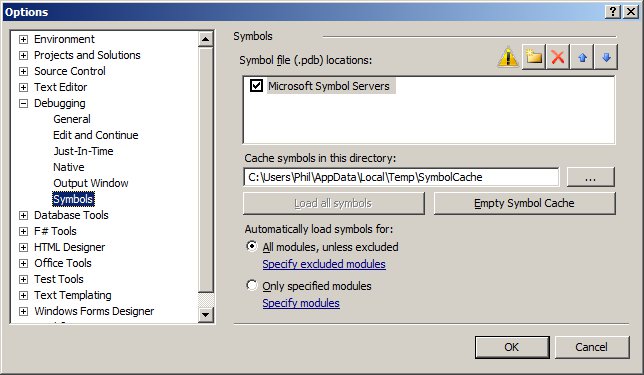
    • Once I got the system running, there were piles of “PDB” warning messages (i.e. “‘C:WindowsSysWOW64ntdll.dll’, Cannot find or open the PDB file “). You can fix these by getting the debug symbol tables from microsoft:
      •  tools->options…
        • Choose Debugging->Symbols from the list, then check “Microsoft Symbol Servers” then click OK and rebuild. Here’s a screenshot
    • Having an odd problem with setting the background color. I need to set the glClearColor() in the predraw, before every frame, otherwise it comes up as black. Not sure why.
      • Turns out that in FLTK GL windows, the graphics context is reset after things like a resize. THis means that the init code can’t be in the constructor, but rather needs to be in the draw function in the following way:
	drawUniverse(){
		if(!valid()){
			glEnv->init(w(), h()); 	// called when the context
						// has been (re)created
		}
		glEnv->predraw(w(), h());
		draw();
	}

Phil 1.17.12

8:00 – 5:00FP

  • Continuing on with collision detection
  • But first, I need to be able to see a text overlay. Looks like lwjgl has this with their Slick-Util lib. Ugh. This is getting harder than I was hoping….
  • Moving hand code over to MSVC, after installing updates
    • Building the debug and release dlls
  • Another take on 3D. This works in your iPhone: http://css-3d.org/. An example of a website that uses this is http://acko.net/. And there’s http://mrdoob.github.com/three.js/, also. It’s a JavaScript library that renders to WebGL or SVG
  • Getting Started with Three.js

Dong Shin 01.13.2012

  • LoadApplet GWT Application
    • http://www.fgmdev.com:8080/LoadApplet/LoadApplet.html
    • loads Java Applet specified in the main
    • uses JSNI to communicate with the Applet
    • Test3DApplet.java has examples of calling Applet’s methods and specifying the callback from the Applet
      • public native void setColor(String color) /*-{
        $wnd.document.getElementById(“myApplet”).getApplet().setColor(color);
        }-*/;

        public native void getFramerate(Test3DApplet x) /*-{
        $wnd.showFrameRate = function(frameRateStr) {
        x.@com.fgm.loadApplet.client.applet.Test3DApplet::showFrameRate(Ljava/lang/String;)(frameRateStr);
        }
        //        $wnd.showFrameRate(“01000”);
        $wnd.document.getElementById(‘myApplet’).getApplet().getFrameRate(
        “showFrameRate”);
        }-*/;

        public void showFrameRate(String frameRateStr) {
        GWT.log(“frameRate: ” + frameRateStr);
        frameLabel.setText(“Framerate: ” + frameRateStr);
        }

    • checked into /Sandbox_folders/DONG_SANDBOX/LoadApplet

Phil 1.5.12

8:30 – 4:30 VISIBILITY

Phil 1.4.12

8:30 – 4:30 VISIBILITY

  • Internet access is *slow* today.
  • Tried to get ahold of Clif today to see what I should be doing. No luck yet.
  • Deployed the lwjgl war to our servers. All seems to be working well.
  • Working on shaders.

Phil 1.3.12

8:30 – 4:30 VISIBILITY

  • My timesheet’s not working. Sent Sally a note with a screenshot. Turns out the system is shut down for the week.
  • Going to document all the moving pieces of the system – done
  • Shader example for LWJGL: http://lwjgl.org/wiki/index.php?title=GLSL_Shaders_with_LWJGL
    • I think the shaders are going to have to be stored as assets in the jar file? Or maybe deployed in the war?
    • Got the shader code working. That was easy. Not messing with making it an applet yet – I’m going to work on making some more sophisticated shaders. Starting here: http://www.lighthouse3d.com/tutorials/glsl-tutorial/
  • A physics library. How cool: http://jbullet.advel.cz/
  • And a 3D engine: http://www.jpct.net/index.php That also works in applets.
  • Installed RenderMonkey 1.82 for shader work.
  • Charge 32.5 hours to leave on this timesheet!
  • Trying to check in the sandbox project, but SVN isn’t asking for my password and as such, failing. Grrrr. Fixed.
    • The correct SVN client for Indigo (Eclipse 3.7) is the one that is can be reached at “Indigo – http://download.eclipse.org/releases/indigo&#8221; in the “Install New Software” dialog. Select the “Collaberation” component and get the SVN pieces. I installed the following:
      • Subversive SVN JDT Ignore Extensions (Optional)(Incubation)
      • Subversive SVN Team Provider (Incubation)
    • And that seems to work. I now have two SVN view categories that I have to choose between but I’m afraid to uninstall.