Category Archives: 3D Charting

Phil 6.18.14

Phil 8:00 – 5:30 SR

  • Hey! A full day that I can work!
  • Backups
  • Integrating wedge size adjustment – animation, tooltips, add and delete, and rippling across all the wedges.
  • Got size adjustment working, but timing is off? Fixed.
  • Adding wedges is done.
  • Rippling is done.
  • Working on deleting wedges. Done, but there are some artifacts. Select doesn’t work the first time on post-deleted wedges. Auto naming is too naive – we can get multiple “Pie Chart 3”, for example. There needs to be an overall count or id field.
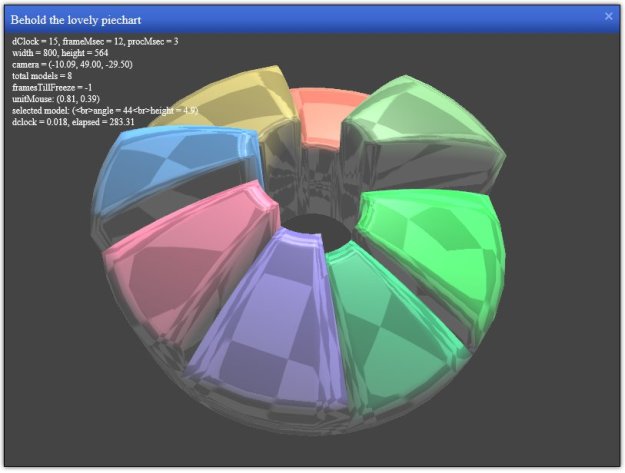
  • Anyway, here’s progress for testing on other machines: http://philfeldman.com/WebGLPieChartTest.html

Phil 6.17.14

8:00 – 1:00

  • DB Backups
  • Pie charts
    • Creating a WebGLPieWedgeComponent so that it can hang on to the current and desired angles and calculate transitions as needed.
    • Refactored wedge calculation to reside in WebGLPieWedgeComponent.
    • Hanging onto start and end angles as well as vertices.

Phil 6.13.14

8:00 – 5:00 SR

  • DB backups
  • Lenny is now security guy for our servers! And is getting the paperwork done that I was forbidden to do. And our authorization is now through September 9
  • Pie Charts!
    • Chart description (XML or JSON?). XML. And after a lot of flailing, I’m producing an xml description and reading it in. JS is very clunky WRT traversing XML. Basically every time I think it’s going to be something easy, JS makes it into an all day affair.
    • Tooltips
    • Calculations
    • resizing
    • Legend (in 2D overlay. Match the color to the Math.max(ambientColor, emissiveColor) of the wedge.
    • Labels (plus percent/value) with indicator lines leading to the outer top of the wedge. This means that labels will need to have a 3D offset option.
    • Upload?

Phil 6.12.14

8:00 – 12:00, 2:00 – 5:00 SR

  • DB backups
  • The svn backups failed yesterday when my computer decided to reset the connection to the server. Trying again.
  • Add compute vertex normals to the pie chart – see if we can get rid of the flat shading artifacts.
  • Make a pieChartCanvas – done. Now moving the wedge creation parts into the canvas.
  • Read in XML configuration files for pie chart and network chart.

Progress for today:

pieChartTest

Phil 6.11.14

8:00 – 5:00 SR

  • Backups
  • Found some issues in the slides where PM Actuals are greater than Obligations. Lenny’s looking into what might be the issue. Possibly dates.
  • Meeting with Tim?
  • Charts!
    • Fixed the non-square bug. I was stepping values by the wrong side.
    • Now, that’s a nifty looking pie chart if I say so myself:

pieChartTest

Phil 6.10.14

8:00 – 4:00

  • Backups
  • Submitted Lenny as our sever security guy.
  • Charts!
    • Worked on calculating the pie chart geometry. Close, but the math only works for squares. Somewhere is a bug that has the radius and angle sides confused. Tomorrow…
  • ToDo:
    • Create a pie chart canvas
    • Better reflection map.
    • Look into tessellation as a way to create a curved surface, otherwise a grid who’s y-axis conforms to a hemisphere should be fine.
    • Better background
    • Add lighting for selected wedge
    • Start on XML description of chart data
    • Animated transitions for value changes. Remember that the arc perimeter will have to travel on polar coordinates

Phil 5.6.14

9:00 – 5:00 SR

  • Db backups
  • Updated Java on the servers
  • Installed Dong’s new views. Lenny’s testing. There are some issues that he’s noting in an email. It appears that all the old data that were deleted are back, but none of the new data is visible.
  • Edit task list to provide hours.
  • More picking
    • Unitizing the mouse position worked
    • Changing userData to a pointer to the model and using the name field.
    • Done. That was not too bad!
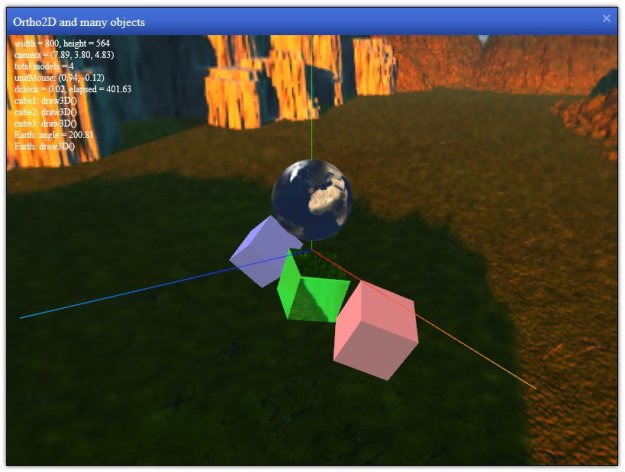
  • Adding reflection maps
    • Added skybox to canvas
    • Added reflections. Going to try for a shiny textured earth tomorrow, then maybe some dragging?

yuiWebGl

Today’s progress.

Phil 5.1.14

8:00 – 5:00 SR

  • DB backups
  • Deployed the rest of RQ
  • Status Report!
  • Some weird problem where Dong’s code is (possibly) throwing an exception while reading properties. Maybe put some command-line diagnostics in the main?
  • JavaScript
    • Show/hide stage – done
    • Ortho2 – done
    • Reflection maps
    • Simple physics
    • Model loading

yuiWebGl

Today’s fun

Phil 4.30.14

8:00 – 5:00 SR

  • DB backups
  • Deploy new RQ – or at least most of it…
  • Got the list of desired enhancements. Need to assign hours.
  • JavaScript
    • Threejs examples
    • Work on making a YUI module that extends WebGLComponent – Done!
    • Added three.js loading capability. Easy!
YUI({
        groups:{
            threejs:{
                base: './libs/',
                async: false,
                modules: {
                    'threejs': {
                        path: 'three.js'
                    }
                }
            },
            localModules:{
                base: './BasicBaseElements/',
                modules: {
                    'WebGLCanvas': {
                        path: 'WebGLCanvas/js/WebGLCanvas.js',
                        skinnable: true
                    },
                    'WebGLComponent': {
                        path: 'WebGLComponent/js/WebGLComponent.js',
                        skinnable: false
                    }
                }
            }
        }
    }).use('threejs', 'WebGLCanvas', 'WebGLComponent', 'panel', 'dd-plugin', function (Y) {...});
  • Ok, now to inheritance
  • To inherit in YUI, it looks like all you have to do(?) is to use Y.Base.create, and specify the component that you are extending. Here’s how it looks:
YUI.add('WebGLSphere', function (Y) {
    "use strict";

    // handy constants and shortcuts used in the module
    var _LANG = Y.Lang;
    var _NAME = 'WebGLSphere';


    // publish the global prototype
    Y.WebGLSphere = Y.Base.create(
        _NAME, // the name of this module (for debugging
        Y.WebGLComponent, // the class we are extending (can be Widget too)
        [], // any extensions that we want to properties or methods (e.g. ArrayList)

        // Instance members are the properties and methods that go into the class prototype, those that
        // each instance will get a copy and usually need to be references by 'this'
        {
            // prototype variables

            // prototype methods

        },
        //  Attributes - accessed through this.get('attrName') and this.set('attrName', value).
        // Note that we can do "type" checking here with validators
        {
            ATTRS: {
		myValue:{
			value: 1.0
		}
            }
        }
    );

}, '0.1', {
    requires: ['WebGLComponent'],
    skinnable: false
});

In this case, the module I’m creating is Y.WebGLSphere. I am extending it from Y.WebGLComponent. In the code above, it does nothing. Next, I’m going to override the initModel function to create a sphere and the initializer to take a jpg to use as a texture.

yuiWebGl

Phil 4.29.14

8:00 – 4:00 SR

  • DB Backups
  • Breaking out models from the scene. Figuring out what parts of THREE.js were needed to work took a bit of time but the results are good.
  • Had a lot of trouble with “this” today. The lesson learned is that when a locally declared function is called from outside the class, there is no “this”. To get that to work you have to have the function AND the variable referenced in the prototype. If the variable is a reference, then it appears that you can get away with declaring it locally, but what really seems to be happening is that the same reference is being shared “globally” across all instances. If the variable is declared in the prototype, it’s unique. Here’s all of WebGLComponent. Note that mesh and dprintArray are declared in the prototype:
YUI.add('WebGLComponent', function (Y) {
     "use strict";

     // handy constants and shortcuts used in the module
     var _LANG = Y.Lang;
     var _NAME = 'WebGLComponent';

     // private variables


     // private function predefinitions. We can "publish" them at the end of this object
     var _initializer;
     var _initModel;
     var _setPosition;
     var _setScale;
     var _update;
     var _dprint;
     var _dshow;

      // private function definitions

      /* The initializer method has several tasks. First, it should set any properties that need to be
      initialized to objects or arrays. Then it will publish all the events this class will produce.
      the cfg object is an arbitrary object such as {myValue:321, foo:'bar'} */
     _initializer = function (cfg) {
         //Y.log("--->The following config object was passed into the RemoteDataChart initializer.'"+cfg.myValue+"'");
          this.dprintArray = new Array(100);
          this.dprintArray.length = 0;
          if (cfg.hasOwnProperty('objName')) {
              this.set('objName', cfg.objName);
     }
     if (cfg.hasOwnProperty('timeScalar')) {
          this.set('timeScalar', cfg.timeScalar);
     }
     this.initModel();

     };


     _initModel = function () {
          var geometry = new THREE.CubeGeometry(1, 1, 1);
          var material = new THREE.MeshPhongMaterial({color: 0xFFFFFF});

          var mesh = new THREE.Mesh(geometry, material);

          this.set('object3d', mesh);
          this.mesh = mesh;
     };

     // setPosition - move the object to a new position
     _setPosition = function (x, y, z) {
          if (this.mesh) {
             this.mesh.position.set(x, y, z);
          }
     };

    //setScale - scale the object
     _setScale = function (x, y, z) {
     if (this.mesh) {
         this.mesh.scale.set(x, y, z);
     }
     };


 _update = function (elapsed) {
          var rate = this.get('timeScalar');
          var angle;
          if (this.mesh) {
              this.mesh.rotation.x += rate * elapsed;
              this.mesh.rotation.y += rate * elapsed;
              this.mesh.rotation.z += rate * elapsed;
              angle = this.mesh.rotation.x;
              this.dprint("angle = "+angle.toFixed(2));
          }
 };


 _dprint = function(str) {
          this.dprintArray.push(this.get('objName')+": "+str);
 };

 _dshow = function(dpa) {
          var i;
          for(i =0; i < this.dprintArray.length; i++){
              dpa.push(this.dprintArray.shift());
          }
          this.dprintArray.length = 0;
 };

 // publish the global prototype
 Y.WebGLComponent = Y.Base.create(
      _NAME, // the name of this module (for debugging
      Y.Base, // the class we are extending (can be Widget too)
      [], // any extensions that we want to properties or methods (e.g. ArrayList)

          // Instance members are the properties and methods that go into the class prototype, those that
          // each instance will get a copy and usually need to be references by 'this'
      {
         // prototype variables
          mesh: null,
          dprintArray: null,

          // prototype methods
          initializer: _initializer,
          initModel: _initModel,
          update: _update,
          setPosition: _setPosition,
          setScale: _setScale,
          dprint: _dprint,
          dshow: _dshow
 },
 // Attributes - accessed through this.get('attrName') and this.set('attrName', value).
 // Note that we can do "type" checking here with validators
 {
          ATTRS: {
              timeScalar:{
                  value: 1.0
              },
              objName:{
                  value: "unset"
              },
              object3d:{
                  value: null
              }
          }
     }
 );

}, '0.1', {
 requires: ['base-build', 'node', 'event'],
 skinnable: false
});

Phil 4.28.14

8:00 – 5:00 SR

  • DB backups
  • Lenny’s making progress in as our new security guy
  • Need to fix the appropriation year calculations in the fake data generator. Done
  • Need to build a YUI template and store it off as a complete project. Done, but I spent a while running in circles trying to get resize to work on the YUI panel. It turns out that you have to enable resize on the node the panel points at. So the code kind of looks like this:
 // If we want to make the panel resize, we have to manipulate the srcNode.
 // This must be done before the Panel is created
 var n = Y.one("#topNode");
 n.plug(Y.Plugin.Resize);

 var panel = new Y.Panel({
     srcNode : n,
     x :200,
     y :100,
     headerContent : 'A Panel containing a widget',
     plugins : [Y.Plugin.Drag]
 });
 panel.render();
  • This also requires that the style for the div have the position: relative property set. Here’s how it’s done in this example:
.topNode{
     position: relative;
     width:800px;
     height:640px;
     background: #bcbcbc;
     overflow: hidden;
}
  • I then spent a while seeing if typescript could be integrated, but it and YUI are really two very different patterns.
  • Working on the WebGL container
    • Set for 2D/3D
    • use defaults (ambient/directional light, perspectives, etc)
    • Show/hide stage
    • Add models. Looking at the code, the cube is currently added as a mesh to a scene. Need to look into how to break that apart. Going to start with the “interaction-simple.html” code from the webgl book and try adding the cube in as a model first.

Phil 4.25.14

8:00 – 5:00 SR

  • DB Backups
  • Helping Dong out with some questions he has. Some queries are running on the production servers that don’t run on his dev box?
  • Finish financial reporting
  • JavaScript
    • Reworking WebGLCanvas. I think it’s better. The structure is now:
      • YUI.add(‘ModuleName”, function(Y) {} wrapper
        • List of all the private variables, using _myVariable notation
        • List of all the private variables that will point at functions (e.g. var _myFunction)
        • The function declarations (e.g. _myFunction = function (args) {};)
        • The publication section – Y.WebGLCanvas = Y.Base.create({/* vars*/}, {/*attrs */});
          • in the {/*vars*/} object, the prototype function vars are matched to a local var (defined above). It looks like this
            • myProtoVariable: null,
            • myProtoFunction:  _myLocalFunction,
            • etc.
          • There are no bodies to anything, just pointers to functions that have already been declared. Closure takes care of the wrapping of appropriate module data. This way, exactly what is in the prototype can be quickly seen.
          • The {/*attrs*/} object is handled in the ‘traditional’ YUI way, since each attribute is actually a cluster of small sub-objects, no clarity is gained by breaking things up.
      • Still have to see if this mechanism extends correctly, but that’s next week.
    • Spent a good deal of time getting panel components to assemble correctly. I had to go digging for the height of the header and allow a modified height value to be passed into the WebGLCanvas. Sheesh.

yuiWebGl

Still, good progress for the week.

Phil 6.4.13

8:00 – 11:30 SR

  • Backups and disk cleaning
  • Conversation with Lenny about how to handle COGNOS uploads
    • non MIPR/EAO are all manually claimed
    • (MIPRs and EAOs) get automatically mapped, and don’t have to go through the claiming process (budget center and Req ID match the budget line item)
    • All unclaimed should always be shown.
    • If a MIPR line item is incorrectly claimed, it can be unclaimed, at which point it will have to be manually claimed

11:30 – 4:30 FP

  • Making nice clean classes for audio
  • Emitter goes into the SampledSound base class – done. Almost easy, though I had to go and relearn how C++ constructors work. Gawd, it’s been a while…
  • Everything else goes into BasicAudio – done. Had some problems with frequency until I realized that I hadn’t zeroed out the listener velocity.
  • And actually, I need to be able to set velocity for doppler effects. Need to add methods like the position methods tomorrow.

Phil 3.29.12

8:00 – 4:00 CSIP

  • Drools JBoss Rules 5.0 Developer’s Guide
    • It is not only difficult to represent business logic in a imperative programming style language, but also hard to differentiate between code that represents the business logic and the infrastructure code that supports it.
    • We declare rules in pretty much the same way as the business analyst does the requirements—as a group of if-then statements. The rule engine can then take these rules and execute them over our data in the most efficient way. Rules, which have all of their conditions true, have their then part evaluated. This is different from imperative style programming languages where the developer has to specify how it needs to be done explicitly (with a sequence of conditionals and loops).
    • rule represents one requirement. This is more readable and maps to business requirements more naturally.
    • Well, having the right resource makes a difference. I have compiled and run a simple set of rules against multiple objects!
    • eval is a catch-all solution. It allows execution of any Java/MVEL code (according to the selected dialect) that returns true or false. It should be used only as a last resort when all other options have failed. This is because the rule engine cannot optimize eval. The expression is evaluated every time there is a change in the current rule’s condition (a fact is added, modified, or removed). They don’t have to return time-constant values. Writing eval as the last condition in a rule is a good practice.
    • How to get a reference to the current class being evaluated: $a:Account ( balance < 100, name != “Ted”). The ‘$’ is convention and not required

Lunch meeting to go over Noveta changes