Category Archives: 3D Charting

Phil 3.5.12

8:00 – 9:30 VISIBILITY

  • Checking up on email, trying to get access to the presentation slides for the demo, etc. I won’t steal Mikes thunder about progress with getting VISIBILITY swfs running

9:30 – 4:30 FP

  • Advanced Shaders (Chapter 11)
    • Geometry shaders run once per primitive. This means that it’ll run once per point for GL_POINTS; once per line for GL_LINES, GL_LINE_STRIP, and GL_LINE_LOOP; and once per triangle for GL_TRIANGLES, GL_TRIANGLE_STRIP, and GL_TRIANGLE_FAN.
    • GL_LINES_ADJACENCY, GL_LINE_STRIP_ADJACENCY, GL_TRIANGLES_ADJACENCY, and GL_TRIANGLE_STRIP_ADJACENCY allow the geometry shader to get at the vertices that are adjacent to the particular piece of geometry that we’re interested in. I’d assume  that we can also manipulate those pieces, though I’m not sure that’s a good idea.
    • Convolution filters can be generated as a texture (even an image), and then used to modify what’s being rendered. For example, the following should be usable as a blur filter, assuming that the weights add up to 1.0 (which could be done as a pre-processing pass on the data before the texture is made):
    • Got the demo that uses a fragment shader to draw a Julia Set kind of working.
    • Tried to start Uniform Buffer Objects, but discovered that my brain was full.

Phil 3.2.12

8:30 – 1:30 FP

  • Really good page: http://www.opengl.org/wiki/Common_Mistakes
  • Advanced buffers – done
  • Fragment operations (Chapter 10)
    • Order-independent transparency using multisample buffers. Looks pretty straightforward. Need to add that. Possibly to ScreenRepaint?
  • Advanced Shader Usage (Chapter 11)
    • Physical simulation, such as meshes. Should be nice for network visualization…
  • Found the reason for why screenwidth must be a multiple of 4 (from http://www.opengl.org/wiki/Common_Mistakes#Texture_upload_and_pixel_reads):
  • Texture upload and pixel reads

    You create a texture and upload the pixels with glTexImage2D (or glTexImage1D, glTexImage3D). However, the program crashes on upload, or there seems to be diagonal lines going through the resulting image. This is because the alignment of each horizontal line of your pixel array is not multiple of 4. That is, each line of your pixel data is not a multiple of 4. This typically happens to users loading an image that is of the RGB or BGR format (in other words, 24 bpp image).
    Example, your image width = 401 and height = 500. The height doesn’t matter. What matters is the width. If we do the math, 401 pixels x 3 bytes = 1203. Is 1203 divisible by 4? In this case, the image’s data alignment is not 4. The question now is, is 1203 divisible by 1? Yes, so the alignment is 1 so you should call glPixelStorei(GL_UNPACK_ALIGNMENT, 1). The default is glPixelStorei(GL_UNPACK_ALIGNMENT, 4). Unpacking means sending data from client side (the client is you) to OpenGL.
    And if you are interested, most GPUs like chunks of 4 bytes. In other words, RGBA or BGRA is prefered. RGB and BGR is considered bizarre since most GPUs, most CPUs and any other kind of chip don’t handle 24 bits. This means, the driver converts your RGB or BGR to what the GPU prefers, which typically is BGRA.
    Similarly, if you read a buffer with glReadPixels, you might get similar problems. There is a GL_PACK_ALIGNMENT just like the GL_UNPACK_ALIGNMENT. The default GL_PACK_ALIGNMENT is 4 which means each horizontal line must be a multiple of 4 in size. If you read the buffer with a format such as BGRA or RGBA you won’t have any problems since the line is already a multiple of 4. If you read it in a format such as BGR or RGB then you risk running into this problem.
    The GL_PACK_ALIGNMENT can only be 1, 2, 4, or 8. So an alignment of 3 is not allowed. You could just change the GL_PACK_ALIGNMENT to 1. Or you can pad your buffer out so that each line, even with only 3 values per pixel, is a multiple of 4.


Phil 3.1.12

8:30 – 10:30 VISIBILITY

  • Set up the root index page to point at working versions of the VISIBILITY system until we get everything working on one server.
  • Asked for the slides to the meeting yesterday. I’m thinking about using it to set up the slideshow for the demo.
  • Pinged Laurie about getting date information so that I can finish submitting my forms.

10:30 – 12:30 FP

  • Back to reading through the screen buffers chapter.

12:30 – 2:30 interview

2:30 – 4:30 FP

  • Some reading, some walking through the circuit board design with Tom

Phil 2.29.12

8:30 – 11:00, 12:30 – 3:00 VISIBILITY

  • Worked on getting Data Visualization working
  • ISR/PMO meeting from 1:00 – 3:00

11:00 – 12:30, 3:00 – 5:00 FP

  • Working on multiple rendering surfaces. For the trivial case, I’m going to try to take the blurred image and invert the colors.
  • Added definition of the vertex and fragment shaders in the ScreenRepaint class, since it’s pretty generic.
  • Took screen rendering out of the Gl_ShaderWindow base class and added two instances to the GeoTestShaderWindow. Everything works just as it should.
  • Meeting at UMBC on surface displays, journals and other things. Looks like I’m on a team to build a “Surface-style” interface for the visually impaired. Meetings are every Wednesday at 4:30

Phil 2.24.12

8:30 – FP

  • I think I found GLSL documentation! http://www.opengl.org/sdk/docs/manglsl/
  • A working convolution filter that blurs anything above a certain luminance:
  • #version 150
    // glow.fs
    // outputs the color negative of a texture
    //
    
    in vec2 vTexCoord;
    
    uniform int screenWidth;
    uniform int screenHeight;
    
    uniform sampler2D textureUnit0;
    
    vec4 getTexOffset(const sampler2D texUnit, const vec2 texCoord, const float dx, const float dy){
    	vec2 offset = texCoord + vec2(dx, dy);
    	return texture(textureUnit0, offset);
    }
    
    void main(void)
    {
    	float dx = 1.0 / float(screenWidth);
    	float dy = 1.0 / float (screenHeight);
    
    	float x;
    	float y;
    	vec4 blurSum = vec4(0, 0, 0, 0);
    	float patchSize = 4.0;
    	float xmin = -patchSize*dx;
    	float xmax = patchSize*dx+dx*0.5;
    	float ymin = -patchSize*dy;
    	float ymax = patchSize*dy+dx*0.5;
    	float count = 0;
    
    	for(x = xmin; x < xmax; x += dx){
    		for(y = ymin; y < ymax; y += dy){
     			blurSum += getTexOffset(textureUnit1, vTexCoord, x, y);
     			if(count > 1000){
    				discard;
    			}
    			count += 1.0;
    		}
    	}
    	float weight = 1.0/count;
    	vec4 blured = vec4(blurSum.r*weight, blurSum.g*weight, blurSum.b*weight, 1.0);
    	vec4 sharp = texture(textureUnit0, vTexCoord);
    
    	float luminance = blured.r + blured.g + blured.b;
    	if(luminance > 1.0){
    		gl_FragColor = blured;
    	}else{
    		gl_FragColor = sharp;
    	}
    }
  • And here’s the picture it produces. Note the sharp moon and gridlines with the blurry sun 🙂
  • Next on the hit parade, add a test to see if the corners of the convolution filter touch anything above the luminance threshold and discard if it doesn’t. My guess is that should speed up things a lot. Done. Discovered that there are some odd problems that crop up as the screen gets made quite large. This could have something to do with the fact that I’m not checking to see that the convolution patch’s coordinates can run off the texture (i.e not clamped between 0.0 and 1.0)?
  • Migrate the screen drawing to a DrawableObject class. I’m pretty sure it should work there, as long as it’s called after postDraw3D(). In fact, it should be possible to have multiple screen drawing classes, though I’m not sure why.
  • Add shader directory to svn repo – done
  • And it appears that after a while, something is clogging the graphics pipeline, because the drawing slows way done. This does look like it’s due to the shader, as the neg.fs doesn’t seem to be slowing things down. Yep,  adding clamping to the glow.fs shader fixed that problem. Still have the problem where the screen texture gets messed up if the window gets too big…
  • So here’s the better version of the fragment shader
  • #version 150
    // glow.fs
    // outputs the color negative of a texture
    //
    
    in vec2 vTexCoord;
    
    uniform int screenWidth;
    uniform int screenHeight;
    
    uniform sampler2D textureUnit0;
    
    void luminanceTest(const sampler2D texUnit, const vec2 texCoord, const float xmin, const float xmax, const float ymin, const float ymax, const float luminance){
    	vec2 ll = clamp(texCoord + vec2(xmin, ymin), 0.0, 1.0);
    	vec2 lr = clamp(texCoord + vec2(xmax, ymin), 0.0, 1.0);
    	vec2 ur = clamp(texCoord + vec2(xmax, ymax), 0.0, 1.0);
    	vec2 ul = clamp(texCoord + vec2(xmin, ymax), 0.0, 1.0);
    
    	vec4 total = texture(texUnit, ll);
    	total += texture(texUnit, lr);
    	total += texture(texUnit, ur);
    	total += texture(texUnit, ul);
    
    	float weight = 1.0/4.0;
    	float val = (total.r + total.g + total.b)*weight;
    	if(val < luminance){
    		discard;
    	}
    }
    
    vec4 getTexOffset(const sampler2D texUnit, const vec2 texCoord, const float dx, const float dy){
    	vec2 offset = texCoord + vec2(dx, dy);
    	clamp(offset, 0.0, 1.0);
    	return texture(texUnit, offset);
    }
    
    void main(void)
    {
    	float dx = 1.0 / float(screenWidth);
    	float dy = 1.0 / float (screenHeight);
    
    	float x;
    	float y;
    	vec4 blurSum = vec4(0, 0, 0, 0);
    	float patchSize = 4.0;
    	float xmin = -patchSize*dx;
    	float xmax = patchSize*dx+dx*0.5;
    	float ymin = -patchSize*dy;
    	float ymax = patchSize*dy+dx*0.5;
    	float count = 0;
    
    	luminanceTest(textureUnit0, vTexCoord, xmin, xmax, ymin, ymax, 1.0);
    
    	for(x = xmin; x < xmax; x += dx){
    		for(y = ymin; y < ymax; y += dy){
     			blurSum += getTexOffset(textureUnit0, vTexCoord, x, y);
     			if(count > 1000){
    				discard;
    			}
    			count += 1.0;
    		}
    	}
    	vec4 sharp = texture(textureUnit0, vTexCoord);
    	float weight = 1.0/count;
    	vec4 blured = vec4(blurSum.r*weight, blurSum.g*weight, blurSum.b*weight, sharp.a);
    
    	float luminance = blured.r + blured.g + blured.b;
    	if(luminance > 1.0){
    		gl_FragColor = blured;
    	}else{
    		gl_FragColor = sharp;
    	}
    }

Phil 2.23.12

8:00 – 4:30 FP

  • Step 1 – make a screen-aligned ortho polygon and make sure it’s drawing correctly with a simple shader, and that the text overlay still works – done
  • Step 2 – copy texture code over from modified pix_buffs.cpp – done. Other textures seem to mess everything up.
    • Added glActiveTexture(GL_TEXTURE0); to SolarSystem, which fixed the missing texture problem, but the screen texture still gets messed up. GOing to try putting in pieces of SolarSystem to find where it breaks, since everything works fine with just the Grid
  • Filling out matrix
  • Back to shaders. For some reason, I have to make sure that the screenwidth is evenly divisible by 4. Not sure why, but it’s easily fixed. So now we have this!
  • Committed everything to svn

Phil 2.22.12

8:00 – 1:00 FP

  • More rendering to a texture
  • Yay! Progress!
  • Yeah, I know it doesn’t look like much, but it means I’m that much less confused…
  • Deleting unneeded code for multiple buffers, malloc, etc.
  • Refresh rate drops on screen resize. Why?

1:00 – 4:30 VISIBILITY

  • VisTool Review

Phil 2.21.12

8:30 – FP

  • Reworking Gl_ShaderWindow so that it renders to a texture. Slow, slow progress.
  • Downloaded the code that goes with the OpenGL 4.0 Shading Cookbook. They seem to be using screen-aligned quads, which is more in line with the blur example. Going to work with that for a while.
  • Made a copy of the pix_buffs demo, and am now trying to simplify

Phil 2.17.12

8:30 – FP

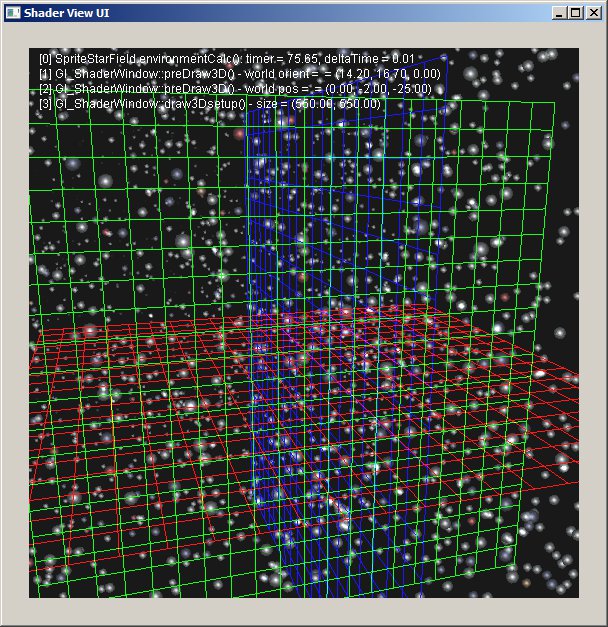
  • Started off the day with sprites. Here’s a starfield:
  • The neat thing about this is that the stars are handled as sprites, which means that it’s possible to handle text overlay with a shader now. I think that the way it could be done would be to create a single grid with all the characters and pass that to the vertex shader with the XY index and size of the letter. The vertex shader moves the texture so that the letter is centered and then passes off the texture and size to the fragment shader, which clips the output so only the particular letter is shown. Not going to do that yet, but it’s probably the first tool after I finish the book.
  • Worked my way through the pixBuffer/motion blur section, but I don’t think it’s worth incorporating into the framework.

Phil 2.16.12

8:30 – 4:30 FP

    • Reflection cube maps today
    • And they are working! The trick to handling rotating reflections is the following (note that the camera matrix is determined before the model roation, and the surface normal is calculated after the rotation.):
	M3DMatrix44f mCameraRotOnly;
	M3DMatrix44f mInverseCamera;
	M3DMatrix33f mNormalMat;

	const M3DMatrix44f &mCamera = modelViewStack.GetMatrix();

	modelViewStack.PushMatrix();
		modelViewStack.Rotate(angle, 0.0f, 1.0f, 0.0f);

		orient44fromMat44(mCameraRotOnly, mCamera);
		orient33fromMat44(mNormalMat, modelViewStack.GetMatrix());
		m3dInvertMatrix44(mInverseCamera, mCameraRotOnly);

		projectionStack.PushMatrix();
			projectionStack.MultMatrix(modelViewStack.GetMatrix());
			glUseProgram(reflectionShader);
			glUniformMatrix4fv(locMVPReflect, 1, GL_FALSE, projectionStack.GetMatrix());
			glUniformMatrix4fv(locMVReflect, 1, GL_FALSE, modelViewStack.GetMatrix());
			glUniformMatrix3fv(locNormalReflect, 1, GL_FALSE, mNormalMat);
			glUniformMatrix4fv(locInvertedCamera, 1, GL_FALSE, mInverseCamera);
			triangleBatch.Draw();
			glUseProgram(NULL);
		projectionStack.PopMatrix();
	modelViewStack.PopMatrix();
  • It seems to be a nice day for pretty pictures. Here’s an example of multitexturing:
  • And now that our connection is better, maybe I’ll install R on fgmdev

Phil 2.15.12

8:30 – 4:30 FP

  • Making good, albiet slow progress on shaders. It’s kind of like programming in pre IDE-days; edit in vim then submit to the GPU compiler for a cryptic message. On the list of things to do is a framework that allows for the more sophisticated editing of shaders in the context of a running program. Will probably do this is Java for eclipse. Looks like there’s a starting point here: http://glshaders.sourceforge.net/
  • Nice progress so far. Let’s see if this video uploads…
  • solarSystem
  • Useful post on how to make a skybox with photoshop: http://www.interlopers.net/forum/viewtopic.php?f=44&t=31549
  • Going to set up a new project – ShaderLearning2
    • Use frame this time in Gl_ShaderWindow. Nope, I need Euler Angles for this.
  • Need to install R on the new server.

Phil 2.10.12

8:00 – 6:00 FP

  • Cleaning up the texture allocation scheme by going to a singleton class like Dprint. Nope, after looking into it, the glGenTextures is guaranteed to return unique handles to textures each time it’s called.
  • Pretty picture:
  • Oh, boy, I get to redo my security form! I guess that’s what I’m spending the rest of the day on.
  • But then the Internet broke, and I had my graphics book cached locally. Can’t work on forms. Darn.

Phil 2.9.12

8:00 –  4:30 FP

  • Onward to the next chapter!
  • Texture maps – we get to make shiny things…
  • Adding a callback to the main window so that textures are released on closing.
  • Textures are working! Going to make things a bit fancier tomorrow.