I had an interesting dream last night. Someone had invented a type of hybrid self driving car. It used a joystick, that could be set for left or right handed people. In manual mode, it worked like a regular joystick – forward accelerates, left and right steer, backwards brakes or reverses. In “self driving” mode, the joystick had nine detents. Pushing it into the fwd detent would autodrive in a lane. Nudging left or right would set up lane changes.
In city driving, putting it in the side detents would set up signaling and sensors for a turn. Going forward into one of the corners would initiate the turn. Parking was initiated by pulling up next to a space and then using the rear corner detent. It was a pretty cool system. I think in the dream the system was prototyped by the child of Mexican field workers who prototyped it on their parent’s pickup truck.
Tasks
Call Aluminess – done! Ships by the end of the week?
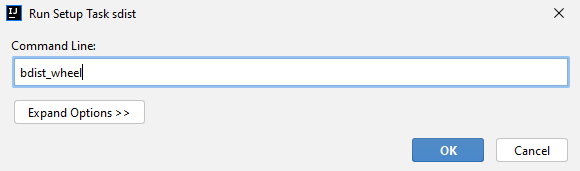
Work some more on deploying Keyword Explorer – done! Here’s how you deploy using JetBains PyCharm
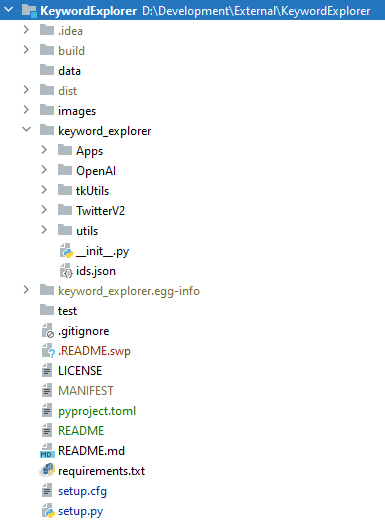
First, make sure you have up-to-date versions of setuptools and twine. Also make sure your directory looks something like this:
Create your setup.cfg file
[metadata]
description-file = README.md
name = keyword_explorer
Then, your setup.py file. It is important to explicitly list the subdirectories in the packages array. Here’s my example (Note that “long_description) is a variable. It is what PyPI uses to create its description, and needs to be updated before creating the wheel. (see here for an example):
from  distutils.core import  setup

setup(
    name='keyword_explorer',
    version= "0.0.3.dev",
    packages=['keyword_explorer',
              'keyword_explorer.utils',
              'keyword_explorer.TwitterV2',
              'keyword_explorer.tkUtils',
              'keyword_explorer.OpenAI',
              'keyword_explorer.Apps'],
    url='https://github.com/pgfeldman/KeywordExplorer',
    license='MIT',
    author='Philip Feldman',
    author_email='phil@philfeldman.com',
    description='A tool for producing and exploring keywords',
    long_description= long_s,
    install_requires=[
        'pandas~=1.3.5',
        'matplotlib~=3.2.2',
        'numpy~=1.19.5',
        'sklearn~=0.0',
        'scikit-learn~=0.24.2',
        'requests~=2.27.1',
        'wikipedia~=1.4.0',
        'openai~=0.11.5',
        'networkx~=2.6.2',
        'tkinterweb~=3.12.2'],

    classifiers=[  # Optional
        # How mature is this project? Common values are
        #   3 - Alpha
        #   4 - Beta
        #   5 - Production/Stable
        'Development Status :: 3 - Alpha',
        "Programming Language :: Python :: 3",
        "License :: OSI Approved :: MIT License",
        "Operating System :: OS Independent",
    ],
)
NEW! As of June 1, 2023, PyPi requires 2FA and tokens to upload:
Set your username to __token__
Set your password to the (long!) token value, including the pypi- prefix (e.g. pypi-AgEIcHl…)
Where you edit or add these values will depend on your individual use case. For example, some users may need to edit their .pypirc file, while others may need to update their CI configuration file (e.g. .travis.yml if you are using Travis).
Advanced users may wish to inspect their token by decoding it with base64, and checking the output against the unique identifier displayed on PyPI.
Moved interview with a biased machine to the front of the book since it could be a nice attention grabber
Started on the Egalitarianism section
Added some stuff to the technology section – Paleolithic and Early modern Human technologies. I’ll probably move the Paleolithic tech to the Egalitarianism section since it explains a lot about that behavior and the amount of evolutionary adaptation that took place around it. We do not look like the other great apes. This is why.
SBIRs
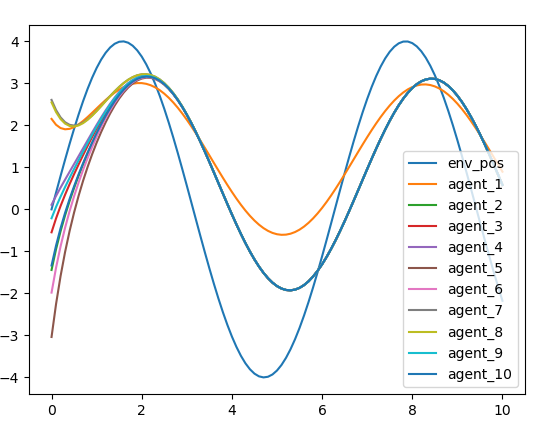
Good chat with Steve. Suggested how to create and visualize multiple attribute maps to see how the loss function is working
Worked out next steps with Rukan:
try predicting more than one point
try sine wave
loss function over 256 collecting loss, but maybe try 16 or some smaller number first
try to train for better convergence to see if it fixes the indexing issue
fix the indexing issue
try pytorch hyperparameter optimizer, probably just LR





 viztales
You must be logged in to post a comment.