Category Archives: Feldman Project

Phil 6.12.12

8:00 – 4:00 FP

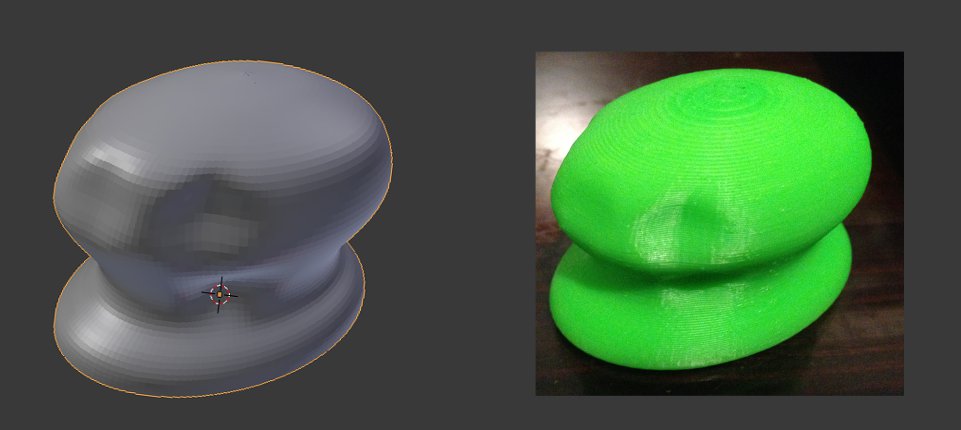
  • Was able to successfully print out the mouse yesterday. It printed “solid” in that it had structure on the inside to allow the piece not to collapse. I also wound up printing it at about 1/3 scale so that it only took an hour to print as opposed to six. Still, I’m pretty happy with the result. Below is the Blender version on the left and the MakerBot printout on the right:
  • Set up an account with Shapeways so that I can print out a more substantial model. And so that I don’t have to sit around for six hours waiting for something to print. Along the way, I learned why my mouse model was solid. You need to generate inner and outer walls and connect them. The printer doesn’t know how to handle printing two sides of a two-dimensional plane. This is controlled in Blender by detecting ‘Non-Manifold’ surfaces. If you find them, that means that the normals in that area are behaving oddly, and need to be fixed. Maya had a ‘clean up option, but blender doesn’t. Still working on how to completely fix a surface, though I do have it to the point what it looks pretty reasonable. We’ll see if Shapeways accepts it.
  • It was accepted, but came out as the wrong size. Trying to scale it now. Well, that seemed to work.
  • It’s now in the printing queue, and should be here by the 22nd!
  • Found the problem with the shape. There were edges *inside* the original shape that I rotated that were confusing the calculation of the normals. Next, time – delete those before rotating.
  • Made a fixed version and uploaded it to Shapeways.
  • Filled out AMPERE paperwork.
  • Make some dice. Done!

Tom 6.8.2012

Start 10:00

  • Spread out everything a little more so that the connectors won’t be under the pcb boards
  • Fixed the labels
  • Moved the sensor circuits so that they are closer to the analog inputs on the arduino

End: 6:00

Phil 6.11.12

7:30 – 6:30 FP

Phil 6.8.12

8:30 – 12:30 ESSO

  • Moved the lab yesterday, so no notes.
  • Customer meeting:
    • Add a read-only admin user? I.e. one that can see everything, but can’t make changes
    • Need capability to print out/copy to clipboard the financial remediation. It sounds like these get included in reports
    • Comments aren’t being shown.
    • Make sure that most recent comments are on the top of the list, with date/time info
    • Unfunded Requests (UFRs) need to be downloadable. This can be done at two levels
      1. Add a link that points to a generic UFR Excel Spreadsheet
      2. Build a partially filled out UFR spreadsheet for the user to save.
    • Service Fincance POC name does not fill from dropdown selection. The field remains blank after the selection
    • Add banners like for VISIBILITY
    • Add regex for portion marking in all freeform text areas. Throw a fit if the portions are not marked.
    • Project Manager screen seems to load really slow sometimes. We might want to add something tat lets us see what it’s hanging on, but more importantly, add some loading animation so that the user doesn’t think the browser is hung.

12:30 – 5:30 FP

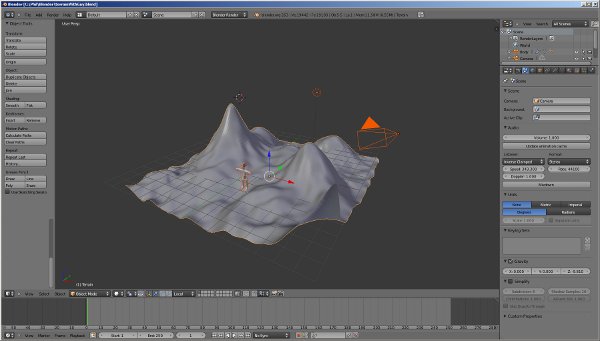
  • More Blender.
  • Got a meeting set up on Monday at 3:00 to learn how to use the MakerBot. Going to try to bring a file to attempt to print.
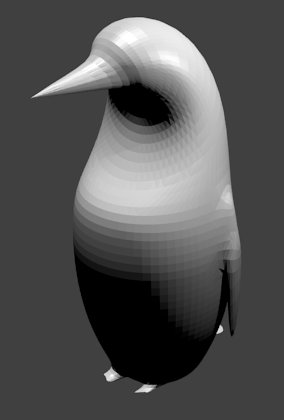
  • Pretty picture:

Tom 6.6.2012

Start: 10:00

  • Finished drawing the nets
  • It didn’t work, I need to rearrange some of the parts for the routes to work
  • Found some extra stuff that I don’t need which should give me some room to move stuff
  • Decided to run the power and ground leads manually to ensure they don’t block the other leads

End 6:00

Phil 5.6.12

8:00 – 4:30 FP

  • More Blender.
  • Nice video tutorials: http://super3.org/blender25
  • Making reasonable progress. Between the videos and the books, this mostly makes sense.
  • Got multiple extrusions, subsurface sampling and swept surfaces working. Tomorrow I may be able to put together a mouse file after the meetings.

Tom 6.5.2012

Start 10:00

  • Continued to plot the nets for the auto-router
  • Tested in the sandbox to see if the auto-router will adjust for new nets.  It does
  • I had the connectors a backwards on the board.  fixed this
  • Double checked the d-sub connectors to make sure the leads were set up right

End 6:00


Tom DeVito 6.5.2012

Start: 12:30

  • Fixed the mounting locations to be in line with the measurements taken Friday
  • Added two more connectors to the board.  One for connecting the analog inputs, the other for connecting the LEDs.
  • Added the circuit for the I2C bus.
  • Connected the nets for the new connectors.

End 6:30

Phil 10.4.12

8:00 – 4:00 FP

  • Cleaning up and packing the project and hardware for move.
  • Got a new GWT in Action. and let Dong and Mike know about it
  • Hmm. There’s a thing called Restlets. Looking into that.
  • Started a throttler for the sound JSON writer.
  • Looks like I start AMPERE on the 11th. Reserved a truck for the 7th-8th. Penske reservation number is 30588476. (06/07/2012 at 8:00 AM, 8685 Washington Blvd, Penske Baltimore, Jessup, MD 20794)

Tom 6.4.2012

Start: 10:00

  • Decided to use standard pin headers for the where the ribbon cable attaches to the board.
  • Started building the nets for the auto routing
  • Talked to Phil about the uncertain future of the project.
  • Added more mounting holes
  • Double checked all measurements.

End: 6:00

Tom 5.31.2012

Start: 10:00

  • Deleted stray traces and  and cleaned up the postions of
  • Transposed amp circuit to be able to be mounted on the back of the board
  • Phil decided we don’t need the amps after all to control volume
  • Finished and saved the amp circuits just in case before removing them
  • Played with teh auto route tool.  It works great

End: 6:00

Phil 5.31.12

8:00 – 4:30FP

Tom 5.30.2012

Start: 9:30

  • Changed the location of the grounds for the midi controllers on the new board
  • Finished routing sensor circuit traces
  • Finished adding amp circuits
  • Routed power lines
  • Still haven’t found a hard drive power connector which I could mount to the board but I did find the footprint for one in the schematics
  • Still looking for either a connector for the ribbon cables or a footprint for the ones I have.  I can use the standard pins without a mounting harness but the harness is nice as it cannot be plugged in the wrong way.
  • Changed the wiring of the midi and amps to use the two prong connectors I have been using for wires going to the arduino.  This will make it easier to swap out parts if needed.

End: 6:00

IT WORK (OVERHEAD) — 1:30-3:00: My laptop has been having intermittent problems which seemed to be characteristic of overheating.  I spent some time today opening up and cleaning off the fan as this is a common problem with this model.  Once the fan was cleaned off, I noticed that the laptop idles at a much lower usage level and even with the overclock settings the fan does not spin nearly as fast.  I ran 3dmark06 to benchmark and test stability.  It ran it very well even with the CPU overclocked to 2.75ghz(normal clock is 2.2ghz).  Furthermore, the area below my left hand, where the graphics card resides, does not get hot anymore.  The fan did not even reach max speed during this test.  Hopefully this solved the stability issues I have been experiencing for almost a year.

Asus has very efficient cooling systems in their laptops, but even the best systems will fail if dust sneaks in.  It is always good to clean the fans periodically, as I have seen computers which seemed destine for the junkyard, fully recover after their cooling systems were cleaned.