Category Archives: Phil

Phil 3.28.12

8:00 – 4:30 CSIP

  • Visualizing Drools (Visualizing Inference Process of a Rule Engine – VINCI’11, August 4–5, 2011, Hong Kong, China.)
  • Onward with chapter 2
    • When there is one or more Activations on the Agenda they are said to be in conflict, and a conflict resolver strategy is used to determine the order of execution. At the simplest level the default strategy uses salience to determine rule priority. Each rule has a default value of 0, the higher the value the higher the priority.
  • Sheesh, had a whole slew of computer problems this morning. I was missing dlls, Some projects were pointing to debug libraries so they couldn’t distribute properly, and then my TortoiseSVN  just… evaporated. Had to reboot, reinstall, and reboot again. Everything appears to be working now though.
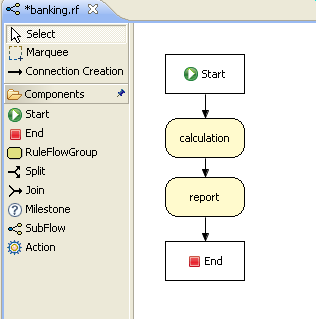
  • Wish I could find where this tool (RuleFlow?) is hidden in eclipse
  • Chapter 3: Advanced Concepts and Theory
    • After regular inserts you have to retract facts explicitly. With logical assertions, the fact that was asserted will be automatically retracted when the conditions that asserted it in the first place are no longer true
    • It is important to note that for Truth Maintenance (and logical assertions) to work at all, your Fact objects (which may be JavaBeans) must override equals and hashCode methods (from java.lang.Object) correctly. As the truth maintenance system needs to know when two different physical objects are equal in value, both equals and hashCode must be overridden correctly, as per the Java standard.
  • Chapter 4: User Guide
  • ‘Hello world’ setup”
    • KnowledgeBuilder kbuilder = KnowledgeBuilderFactory.newKnowledgeBuilder();
      // Check the builder for errors
      if( kbuilder.hasErrors() ) {
          System.out.println( kbuilder.getErrors() );
          return;
      }
      
      // Resources of any type can be added iteratively
      kbuilder.add( ResourceFactory.newFileResource( "/project/myrules1.drl" ), ResourceType.DRL);
      kbuilder.add( ResourceFactory.newFileResource( "/project/myrules2.drl" ), ResourceType.DRL);
      
      if( kbuilder.hasErrors() ) {
          System.out.println( kbuilder.getErrors() );
          return;
      }
      
      Collection<KnowledgePackage> kpkgs = kbuilder.getKnowledgePackages();
  • Ok, this is a nice introduction to concepts, but I’m not really getting the opportunity to build something in an kind of understandable way. There’s not much documentation, and only one book that appears to provide the overview – That’s the “Drools JBoss Rules 5.0 Developer’s Guide”. The reviews on Amazon are mixed, leaning to bad, but it’s the only game in town. I’ve bought and downloaded the Kindle edition and will try that tomorrow.
Phil 3.27.12

8:00 – 8:30 FP

  • Tried running the hand code on my laptop but ran into DLL problems. It was the debug version, so I recompiled the release version today. Let’s see if that makes it easier.
  • A useful page explaining all this, including that debug dlls are not redistributable.

8:30 – 4:30 CSIP

  • Ok, now that I’ve got the examples compiled and running (In Swing! How quaint), let’s see how to use this thing.
  • Chapter 2. Use cases and examples
  • Sent Ed a status update
  • Ok, I got the Drools Developer’s Cookbook, and it looks like I was doing this in the wrong order. Going to start over with the rules engine (Expert)
  • Chapter 1. The Rule Engine
    • An object type constraint plus its zero or more field constraints is referred to as a pattern. When an inserted instance satisfies both the object type constraint and all the field constraints, it is said to be matched.
    • Downloaded drools-distribution-5.3.0.Final, which contains example code. Some problems compiling, but the HelloWorld works, so we won’t worry for now…
    • This process is called inference, and it’s essential for the working of a Stateful Session. Stateless Sessions typically do not use inference, so the engine does not need to be aware of changes to data. Inference can also be turned off explicitly by using the sequential mode.

Phil 3.25.12

10:00 –  2:00 FP

  • What a soggy weekend.
  • Integrating collision detection and response into the hand.
  • Checked out from SVN – still working!
  • Firngertips are now being calculated in world space.
  • Spent a good deal of time getting the global to local (CollisionCube) transformations working. They still haven’t been tested through the rotations, but are working for translation and scaling.
  • Wired up the volume components. At this point the simulation is pretty much ready to hook up to the Arduino.

Phil 3.23.12

8:00 – 12:30 FP

  • It’s going to be an abbreviated day. I’ve got to be over at my parent’s old house in the early afternoon to let in the GB&E guy, and since the weather’s * phenomenal* I’m going to go for a longer and early bike ride. Given all the rain in the forecast for the weekend, I’ll be here to make up the hours, probably more likely on Sunday.
  • Adding in CollisionCube. It’s drawing, and I’m getting fingertip position info for collisions. More on Sunday
  • Checked into SVN

Phil 3.22.12

8:00 – 4:00 FP

  • Looks like I’ll have the CSIP project to charge to soon. Woohoo!
  • debugging RightHand::drawPrimitive() – fixed. Passing by value rather than by reference. D’oh.
  • Shiny hand model! Now I need to wire the graphics to the FingerIO classes – partly done, waiting on putting in the CollisionCube.
  • Tried adding the FingerIO classes directly to RightHand, but the class isn’t instanced by the time show() gets called in KF_GUI. So the FingerIO classes went back to the KF_Hand_window class, and I added pointers to the RightHand class. Not really happy with this, but it will do for now as I get all the other pieces working. And better than the alternative of grabbing the parent of the window class while still reaching into the RightHand class.
  • Next, put all the changed code back into the fluid code – done
  • Adding CollisionCube drawableObject – most pieces are in and I need to test.

4:00 – 5:00 CSIP

  • Spent about 45 min talking CSIP with Ed.
  • Start figuring out drools, with particular emphasis on creating xml that can be ingested and used to create running rule sets. Note that RulePoint could be a starting point for look-and-feel, as this may be the basis for the request for the system.

Phil 3.21.12

8:00 – 3:00 FP

  • Now that the basic framework is put together, adding in the hand. Starting with making shiny cubes and cylinders.
  • When making textures, *don’t* compress your tga files!
  • Added a color modulated reflection shader. This will probably be our main shader for charts, too.
  • Need to add a bit of lighting to the shiny objects. Going to finish building the hand fist.
  • In the process of debugging RightHand::drawPrimitive().

Phil 3.20.12

8:00 – 5:30 FP

  • Spring! That bears repeating. Spring!
  • Working on the hand
  • Building a new FLTK widget to show
    • Communication with Arduino
    • Force on each finger
    • Volume for each finger
    • Sound for each finger
    • Hand view
  • Now I need to wire up the controls
  • Added pointers to the pressure and volume sliders as well as the sound text within the FingerIO helper class. Works well.
  • Wiring up the text output – done. Wound up using a simple multiline Fl_Output class rather than a Fl_Text_Output because when I tried to add a buffer, the code kept crashing trying to create a callback. Not sure that I was making the call in the right place?

Phil 3.19.12

8:00 – 10:30 VISIBILITTY/OH

  • Stopped in to talk to Al F. Things are proceeding apace, apparently.

10:30 – 12:00, 3:00 – 5:00 FP

  • Getting started on the final(?) version of the hand
  • Need to talk to Tom about coding up the arduino, but today’s schedule may not allow. Tomorrow?

Phil 3.14.12

8:00 – 4:30 FP

  • Happy PI day! I wonder if there will be bigger celebrations in 2015?
  • Back to building libraries.
    • Release Library is done.
  • Adding test project to solution that tests the library
    • Discovered that a dll was probably not the way to go, so changed the project settings so that it now generated a static library. For once, that was pretty straightforward – Properties->Configuration Properties->General->Configuration Type and select from the dropdown.
    • Everything is compiling and linking, adding some actual content now.
    • Well I’ll be damned – everything works (In debug and release mode!).
  • Same old picture, but with much better foundations:
  • Installed AtomineerUtils, a nifty plugin if Visual Studio that generates documentation frameworks

Phil 3.13.12

8:00 – 1:00 FP

  • Working on turning the base classes of ShaderLearning2 into a library
  • Creating DLL and static libraries in Visual Studio 2010: http://msdn.microsoft.com/en-us/library/bb384835.aspx
  • Adding copies of headers and libs to the dll project. Trying to make this self-contained.
    • Added include directories to properties
    • Added lib directories to properties
    • Added the following additional dependencies under Linker->Input->Additional Dependencies:
      • opengl32.lib
        glu32.lib
        fltkgl.lib
        FLTKD.LIB
        WSOCK32.LIB
        gltools.lib
    • Yay! My test (Dprintf) is compiling and linking. Onward!
    • Added the following to the “Ignore Specific Libraries”
      • msvcrt.lib
        LIBCMT.lib
    • Done with the debug version of the library, need to verify that it works, then do the release version.

1:00 – 4:00 VISIBILITY

  • Demo – 2, actually. It went well, though we do need to add a ‘loading’ screen to the main project screen. It hung for an awkwardly long time.

Phil 3.12.12

8:00 – 1:00 FP

  • DST == sleeeeeeepy
  • Class from 10:00 – 12:00
  • Going to start converting the hand to the new framework. I need to put some of these parts in a library.
  • Cool thing for the day: http://vimeo.com/36579366

1:00 – 4:00 VISIBILITY

  • Demo prep. Need to build a spreadsheet that has projects and timelines on them. Have a “most recent issue” column. Maybe a “number of times underbudget”  and “number of times late” columns as well
  • The demo is now tomorrow at 2:00, though Dukes will not be there. So it looks like we will have an additional meeting/demo.
  • Spent some time walking Sherry P through VISIBILITY and created an account for her on fgmdev Viztool

Phil 3.9.12

8:00 – FP

  • Chasing down why the refresh rate drops after using glGetQueryObjectiv(drawQuery, GL_QUERY_RESULT, &result);
    • Adding a check to test that the result is available before pulling it.
    • Changed the code so that the hit test is only called once per mouse click. Not sure why that would fix it, but I’m not complaining.
    • Cleaned up and working. Example code for how to do non-fixed pipeline picking in OpenGL shown below:
// Code to show how to use object queries to get picking behavior. For this code to work,
// You'll need to add your preferred rendering framework. This code was pulled from an
// FLTK framework I've been building for data visualization

// Class-wide global variables here for the sake of a compact file
// Classes that are not part of the OpenGl library are from the OpenGl SuperBible,
// which I highly reccomend: http://www.starstonesoftware.com/OpenGL/

GLMatrixStack modelViewMatrix;
GLMatrixStack projectionMatrix;
GLFrustum viewFrustum;
bool isPicking;

// Constructor. Set up picking and the projection and model matrices
PickingExample::PickingExample(int x,int y,int w,int h,const char *l)
: Fl_Gl_Window(x,y,w,h,l)
{
	isPicking = false;
	pickQueryResult = READY;
	glGenQueries(1, &pickQueryID);
	if(pickQueryID == 0){
		pickQueryResult = PICK_ERROR;
	}

	viewFrustum.SetPerspective(45.0f, (float)screenWidth/(float)screenHeight, 0.5f, 1000.0f);
	projectionMatrix.LoadMatrix(viewFrustum.GetProjectionMatrix());
	modelViewMatrix.LoadIdentity();
}

// A slightly modified version of the original gluPickMatrix, taken from:
// http://oss.sgi.com/cgi-bin/cvsweb.cgi/projects/ogl-sample/main/gfx/lib/glu/libutil/project.c?rev=1.4;content-type=text%2Fplain
void PickingExample::setPickMatrix(GLdouble x, GLdouble y, GLdouble deltax, GLdouble deltay, GLint viewport[4])
{
	if (deltax <= 0 || deltay <= 0) {
		return;
	}

	projectionMatrix.LoadIdentity();

	/* Translate and scale the picked region to the entire window */
	GLfloat dx = (float)((viewport[2] - 2 * (x - viewport[0])) / deltax);
	GLfloat dy = (float)((viewport[3] - 2 * (y - viewport[1])) / deltay);
	projectionMatrix.Translate(dx, dy, 0);
	projectionMatrix.Scale((float)(viewport[2] / deltax), (float)(viewport[3] / deltay), 1.0);

	projectionMatrix.MultMatrix(viewFrustum.GetProjectionMatrix());
}

// the main drawing method. In this case, only drawing for picking is done, though it would 
// be easy enough to glClear() afther the picking code, and draw everything  over again with 
// a normal perspective
void PickingExample::draw() {
	GLint result;
	GLint viewport[4];
	glGetIntegerv(GL_VIEWPORT,viewport);

	glClear(GL_COLOR_BUFFER_BIT | GL_DEPTH_BUFFER_BIT);
	modelViewMatrix.PushMatrix();

		// Have some Euler angle rotations and translations just to show how
		// setPickMatrix() doesn't care about eye or model position

		// global eye transformations
		modelViewMatrix.Rotate(eyeOrient[1], 0, 1, 0);
		modelViewMatrix.Rotate(eyeOrient[0], 1, 0, 0);
		modelViewMatrix.Translate(eyePos[0], eyePos[1], eyePos[2]);

		// global world transformations
		modelViewMatrix.Translate(worldPos[0], worldPos[1], worldPos[2]);
		modelViewMatrix.Rotate(worldOrient[0], 1, 0, 0);
		modelViewMatrix.Rotate(worldOrient[1], 0, 1, 0);

		// set up picking
		if(isPicking && (pickQueryResult != PICK_ERROR))
			projectionMatrix.PushMatrix();
				// set the projection matrix so that it's just looking at a (in this case) 10x10 pixel area
				// near the cursor. This method (shown above)
				setPickMatrix(mouseX,viewport[3]-mouseY,10,10,viewport);

				// for each item that you want to test, bracket it with a glBeginQuery()/glEndQuery()
				// You'll need a unique pickQueryID for each model
				glBeginQuery(GL_ANY_SAMPLES_PASSED, pickQueryID);

					// render your model associated with pickQueryID here. It is assumed that
					// the projection matrix and the model matrix will be handled by your shader(s)

				// finish the query for this particular model
				glEndQuery(GL_ANY_SAMPLES_PASSED);

			projectionMatrix.PopMatrix();

			// For each item that you queried above, see if at least one pixel was drawn
			// Again, you'll need a unique pickQueryID for each model
			glGetQueryObjectiv(pickQueryID, GL_QUERY_RESULT, &result);
			if(result)
				printf("hitn");
			else
				printf("missn");

			isPicking = false;
		}
	modelViewMatrix.PopMatrix();
}

Phil 3.8.12

7:30 – 11:00 VISIBILITY

  • Demo prep. See Mike’s notes for more detail

11:00 – 4:00 FP

  • Now that I have the pick matrix worked out, I’m going to see how to ask the pipeline if any pixels have been drawn. Also need to see how to prevent the test drawing from going to the render buffer
  • Generating query indices and deleting them in cleanup()
  • Added a pickRender()  and pickResult() method to DrawableObject
  • Picking works, but seems to slow down the display. Also, GL_QUERY_RESULT_AVAILABLE always returns zero, even if there is a result. And just to make things a little weirder, the call glGetQueryObjectiv(drawQuery, GL_QUERY_RESULT_AVAILABLE, &result) does not slow down the display, but the following almost identical call glGetQueryObjectiv(drawQuery, GL_QUERY_RESULT, &result) does. No ideas about this right now.


Here’s the code in question

static enum TRANSFORM_MODE{UNAVAILABLE, HIT, MISS};
TRANSFORM_MODE pickResult(){
	GLint result;

	glGetQueryObjectiv(drawQuery, GL_QUERY_RESULT_AVAILABLE, &result);
	if(result == 0)
		return UNAVAILABLE; // always returns this

	glGetQueryObjectiv(drawQuery, GL_QUERY_RESULT, &result); // slows down rendering once called.
	if(result)
		return HIT;
	else
		return MISS;
};

Phil 3.7.12

8:00 – 12:00 visibility

  • Spent the morning putting together a demo walkthrough for tomorrow. We build an ‘enhanced’ data set that would support a lot of queries and started to use it to prepare a slideshow. Got through two slides until we discovered that slides weren’t loading properly.
  • The help for Project Assistant is a bit overwhelming. There needs to be some kind of overview and quickstart.
  • There are some issues on Project Assistant that need to be worked.
    • The help on the main screen and the dialog aren’t the same, and don’t look like buttons.
    • The app does not resize when the browser window resizes. It holds onto it’s original size, regardless.
  • Data Navigator’s ‘browser tab title’ is showing up as ‘#’ again.
  • It is possible to save two desktops with identical names

12:00 – 5:30FP

  • My FB account got hacked! Had to spend some time changing passwords and telling people to ignore my ‘hi ERROR!’ message. No idea how that could have happened…
  • Got the projection matrix set up for picking. Here’s how you do it:
void Gl_ShaderWindow::setPickMatrix(GLdouble x, GLdouble y, GLdouble deltax, GLdouble deltay, GLint viewport[4])
 {
	projectionMatrix.PushMatrix();
	if (deltax <= 0 || deltay <= 0) {
 		return;
 	}
	projectionMatrix.LoadIdentity();
	/* Translate and scale the picked region to the entire window */
 	projectionMatrix.Translate((viewport[2] - 2 * (x - viewport[0])) / deltax, (viewport[3] - 2 * (y - viewport[1])) / deltay, 0);
 	projectionMatrix.Scale(viewport[2] / deltax, viewport[3] / deltay, 1.0);
	projectionMatrix.MultMatrix(viewFrustum.GetProjectionMatrix());
 }