Category Archives: Feldman Project

Phil 7.3.12

8:00 – 2:30 ESSO

  • Got all of Mike’s dev stuff from his various flippsers
  • Changed the TestServlet so that it’s fired in Visibility3 rather than VisibilityScriptingServer. Added an html redirect file to the VisibilityScriptingServer directory (TestServlet/index.html), so that the documentation doesn’t have to be changed.
  • Deleted fgm-security-pki project from my workspace. It really didn’t want to go – I had to quit eclipse, delete the folders, then restart eclipse and delete the ghost of the project
  • Added fgm-security-pki back in from svn. This time, I disconnected the maven nature, ran eclipse:eclipse in mvnAssist, and not the project appears to work correctly.

2:30 – 4:00 FP

  • PAD meeting

Tom DeVito 6.24.2012

Start: 12:00

  • Added a spot for the LEDs which I forgot about
  • Continued running traces.
  • Added connectors for LEDs and Sensors
  • Started writing documentation not quite complete at the moment.

End: 8:00

Tom DeVito 6.22.2012

Start: 10:00

  • Cleaned up equipment that was on my desk.  It was placed by the other equipment in.
  • I put all hardware related to the wooden case inside it.  Be careful when moving as there is a cup of screws in there which may or may not be needed.
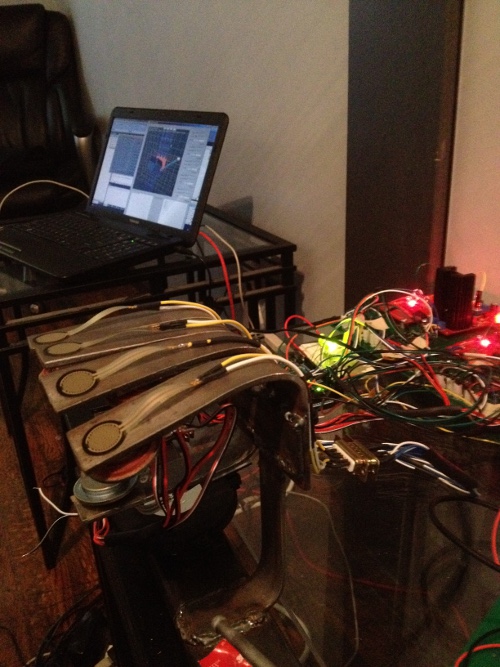
  • Double checked wirring to speakers and sensors.  There was no good way to easily figure out which one went to which.  The ends are labeled and can be spliced into a new connector.  The connector on the board will have the first row with three fingers two on the ends one in the middle, the second smaller row will have the remaining two on the ends.  The ordering will be left to right up and down.  This applies to both speakers and sensors.
  • Started routing the traces for the midi and reset pins of the midi controllers

End: 6:00

Tom 6.21.2012

Start: 10:00

  • Realized my connectors for the midi controller were missing a pin.  Swapped them out.
  • Fixed some routing problems
  • Started looking through my red box of miscellaneous electronics to see what needs to be labeled.
  • Started writing a readme for both versions of the board to hopefully clear any confusion in my absence.
  • Checklist of important things to add to readme:
  1. rating of sensor resistors
  2. mapping of sensor/speaker connectors
  3. general parts list
  4. add numbering which corresponds to the board locations
  • Although the new boards will be more practical, the old boards do have the advantage of the extra volume control if ever needed in the future.

End 6:00

Tom 6.19.2012

Start: 10:00

  • Finalized positioning of all elements and connectors.
  • Cross-referenced sensor circuits with working ones on the previous one to ensure accuracy.
  • added the i2c bus to the board
  • Ran most traces for the I2C communication

End 6:00

Phil 6.19.12

8:00 – 7:00 FP

  • 3:00 Meeting at PAD lab. May go earlier to try printing out mouse
  • Got notice that Shapeways is building the mouse as of 7:45 this morning. I’m guessing it should ship today.
  • Reading Rotary Encoders with an Arduino
  • And the Arduino API. Now that’s useful…
  • Spent a huge part of teh evening in an unsuccessful attempt to print out the new mouse on the new Replicator. I may try going back to the old unit, but the mouse from shapeways is due in a couple of days so maybe not.

Tom 6.18.2012

start: 12:30

  • To my great disappointment it seemed lik enothing after 2ednesday of last week was saved properly
  • Spent time bringing everything back to how it was
  • Phil told me to use subversion to avoid this problem in the future
  • After my converstaion with phil I rememberd that I changed to location of the most recent save due to the near complete status of the schematic.
  • I was able to find the schematic as they were on friday.
  • Drew traces for sensor ciercuits

End 6:30

Phil 6.18.12

7:30 – 3:30 Fp

  • Had trouble printing the mouse last Friday.
    • The version that had the mounting geometry wouldn’t print, so I used the simpler version
    • That pulled up off the stage. I hot-glued it back to its raft, which helped for a while, but then the whole raft pulled away and rotated, which destroyed the print job.
    • I think the way to fix the problem with the model detaching is to add a base that will be cut away later. That will increase the contact patch.
    • I’m installing ReplicatorG, which produces the gcode for the Replicator to try to see what the deal is without going back to the lab.
    • Had to rebuild the entire model due to manifold problems. The new model does create valid gcode.

Tom 6.15.2012

Start: 10:00

  • Rotated and moved the socket area so it is closer to where the arduino plug is
  • added power/ground leads to power the arduino with the power supply
  • Drew all power and ground traces

End 6:00

Phil 6.15.12

7:30 – FP

  • Heading out early to go to the PAD lab and try printing out the mouse.
  • Updating sim and models on the laptop. Done, and hooked up to the hardware!
  • After talking to Tom for a bit, it looks like it might make more sense to buy a cheap deskside system and strip it for parts rather than buy the components.

Tom 6.14.2012

Start: 10:00

  • Found the best position for everything
  • Started drawing nets again
  • Double checked connectors to make sure I can buy the ones I need
  • Should be able to finish tomorrow or at least be really close

End: 6:00


Phil 6.14.12

9:00 – 4:30 FP

  • In a bit late due to dentist app’t.
  • Let’s see if we can learn how to slice geometry today!
    • It’s really easy. Select the object that you want to modify (in object mode), then click on the ‘Object Modifiers’ (crescent wrench) tab
    • Add a ‘Boolean’ modifier. It can be ‘Difference’ ‘Union’, or ‘Intersect’
    • Select the object that the first object will be modified by in the ‘Object’ Field
    • Click ‘Apply’ – That’s it!
  • Next, let’s see if we can make some useful cuts in the mouse. Done! 
  • Useful link to Modifiers in Blender: http://wiki.tesnexus.com/index.php/An_introduction_to_Modifiers_in_Blender


Tom 6.13.2012

Start: 10:00

  • Finished switching connectors for the individual components
  • Moved everything around so that traces would have easier paths
  • Looked up computer parts so we can have the demo all in one box.  Cost looks to be between 250 and 350 for what we need.
  •  Found better connectors for the ribbon to baord connection.

End: 6:00

Phil 6.13.12

8:00 – 5:00 FP

  • In prep for getting the mouse, I’m going add hand navigation to the demo.
  • Done. I added a “move model” choice in the Gl_ShaderWindo base class that sets a float[3] of the current desired(?) model XYZ. It’s up to the inheriting class to do something with it. In this case, I moved the hand origin in XZ space and left the position of the rotating cubes alone.
  • Checked in.
  • More modelling training

Tom 6.12.2012

Start: 10:00

  • For whatever reason I had a very hard time figuring out which connector was a hard drive power connector.  It is molex 8981.
  • The footprint for this connector is not under molex but instead under Thomas Betts in pad to pad which is part of the reason I was confused.
  • Decided to use a single connector per component.  This will make routing the traces more straight foward and may fix the problem I had when I tried before, without adding additional trace layers.

End: 6:00

1:00-4:00(OVERHEAD IT):  Phil’s laptop has been having an intermittent problem where it randomly freezes.  I also noticed that it was pretty slow.

  • I first checked the heat sinks as the laptop is kinda old and intermittent problems can be caused by overheating due to dust.
  • The heat sinks turned out to be cleaner than expected.  Its kinda funny how my computer has a dust filter and somehow had way more dust in it.
  • When I started it back up I noticed the hard drive was running at full speed constantly and seemed to be the bottleneck in the performance.  The main issue seemed to be that windows updates were behind but it was still odd that this would take so many resources when it was only downloading the updates.
  • I did some various other things like checking for malware, cleaning/defraging the registry, and a few other general maintenance procedures.
  • Once the updates and other maintenance was done, the computer seemed to run much better than initially.  There is something strange where the programs that start with windows are using about 3 times as many handles as my computer which also runs vista.  This may be causing some of the excess hard drive use but I am not sure.
  • As the problem was intermittent its hard to say if it was fixed but it does seem faster, so  we’ll see.  If it happens again either windows needs to be reinstalled or the hard drive should be replaced.  I definitely recommend backing up all that isn’t already, as hard drive crashes do cause computers to lock up, and might be a sign its going soon.