Category Archives: Mike

Mike 2.25.2011

  • Helped Alan out with some blog difficulties
  • Made it so you must log in to the SCT blog in order to see anything
  • Added a better log in screen to the SCT blog
  • More work on the data service
  • Able to load object made on the server just fine
  • Had some difficulty creating objects on the client then saving them, the issue was conflicting ids
  • There is now a Flex client ID if the object is made on the client side
  • otherwise the database id is used on both sides

Mike 2.15.2011

After much flailing, learning, and more flailing, I’ve finally made some good progress on managed database access for dynamic objects.  I have meta information being stored in several table which details dynamic object types and their properties.  That part of the database is well-defined while I have another database access which is reconfigured when changes to the meta information are made.

  • If a new dynamic object type is created, the dynamic access session is reconfigured to take in to account a new table for that object type.
  • If a property is added to an existing object type, a new column is automatically added to the table
  • The session reconfiguration is done only once per save request (ie. if 10 new object types come over from the server, all updates are applied to the model before updating the session instead of reconfiguring the session 10 times)
  • There’s currently no plan in place to remove properties from object types but entire object types can be removed (similar to drop table)

Mike 2.14.2011

Worked with Phil to resolve getStrackTrace() calls in our code which were apparently breaking the non-debug version of flash player.

  • Commenting out the violating lines fixed the issue
  • So I then put in put in some conditional compilation flags as defined here
  • And magically even with the debug flags on, the code ran in the non-debug flash player, so by adding lines of code that in theory do nothing, we fixed the problem
  • Reworked the about page to add information about the debug flags and the user’s version of flash player

While playing with database accessing code, I found out how to build a Flex + Java Dynamic Web Project in Eclipse which builds and deploys both the java and flex code all in one swoop.  It also allows debugging of both sides in the same instance of eclipse.  Here are the VERY specific requirements:

  • Install Galileo Eclipse IDE for Java EE Developers (Newer versions of eclipse will produce an error later on)
  • Install the Flash Builder 4 Eclipse plug-in, make sure to pick the Eclipse plug-in from the drop-down list
  • The plug-in is installed with Eclipse Ganymede (too old for what we want to do, and who ships a plug-in with the whole framework anyway?), so we have to tell out Galileo install where the plug-in is:
    • Navigate to your plug-in install directory (‘C:Program FilesAdobeAdobe Flash Builder 4 Plug-in’ which I’ll call PLUG-IN)
    • Copy the file ‘PLUG-IN/eclipse-host-distro/dropins/com.adobe.flexbuilder.feature.core.nl1.link’
    • Paste a copy in to GALILEO-INSTALL/dropins
    • All this file contains is one line pointing to the plug-in install directory
  • Now if you run your Galileo Eclipse, you should be able to open the ‘Flash’ perspective from Window > Open Perspective > Other…
  • Now that the installs are done we can make a project… go to the ‘Flash’ perspective and create a new Flex project, fill in the fields something like this:
  • If you do not see the bottom lines “Create combined Java/Flex Project..” something was not installed or configured correctly in the beginning steps.
  • Click next, here you will configure your server, if you do not have a J2EE server configured, click new and make one, it is fairly straight forward, you simply choose your tomcat version and point to the main tomcat directory
  • You will also need a blazeds.war file which can be downloaded from Adobe here, the binary distro is all you need but there are very nice examples in the full distro
  • After you’re done with this page, click next to configure your flex project, the only line you need fill in is on the bottom ‘Output folder URL’.  If your project is called ‘TestWebProject’ this would look something like ‘http://localhost:8080/TestWebProject’
  • Click finish, if you get an error here which won’t let you finish the project, it may be because your eclipse version is too new… yea, this won’t work any eclipse version other than Galileo as mentioned earlier
  • Next we need to change one thing in the .flexproperties file.    Initially the server’s context root is not set properly after the project has been created. To change this either open the properties of the Flex project ADCDemo, select Flex Server and change the context root to /ADCDemo or change the serverContextRoot property in the file .flexProperties. To do this open the file .flexProperties in Flex Builder (you can find it in the Flex Navigator view in the root folder of the ADCDemo project) and change the property serverContextRoot to the context root of the Web application (“/ADCDemo”). Replace
    serverContextRoot="/WebContent"

    with

    serverContextRoot="/TestWebProject"
  • Now open the ‘Servers’ view from Windows > Open View… (Server > Servers), and add your project to your server by right-clicking on the server and choosing ‘Add and Remove’:
  • Start the server, then run your flex app and you should get a very blank flex app running in your browser
  • From here you can edit Flex code in the Flex perspective and your java code in the Java perspective (I highly recommended switching perspectives as the directory structure appears to change between perspectives)
  • The usual flex remoting files are contained in ‘WebContent/WEB-INF/flex’ and anything in your java src folder will be placed in to ‘WebContent/WEB-INF/classes’ folder during the build so things like log4j.properties go there

Mike 2.8.2011

Working on the back-end database and java interface.  After going through a lot of documentation and partial examples, I figured out a way to dynamically map java HashMaps of key value pairs to a hibernate managed database.  I did it by using the dynamic mapping capability of Hibernate.  Hibernate simply requires an xml document to map keys to database columns.  I plan on creating a meta class structure that will either store object meta information or read it straight from the database tables and create the required xml documents as required.  If a new property is added to a dynamic object, the meta class will generate a new xml document for Hibernate and hibernate takes care of the SQL ALTER calls.

Reasons why this is good:

  • We can make use of dynamic Flex objects
  • Our object types can evolve and grow with time and be transferred between instances
  • We can connect to almost any database type (all types supported by hibernate) without rewriting anything
  • We can make use of libraries made to work with hibernate for things like lazy loading and data pagination
  • We don’t have to write sql queries for most things (if a Car has an Owner and we have a reference to the Car object, calling car.getOwner() will cause hibernate to do the database call for us)

Mike 2.3.2011

Continuing working on paged data sources…

  • Got paged data working within a Flex data grid, it loads pages of 100 records as they are viewed in a datagrid.  The datagrid scrollbar appears as if ALL the records are currently loaded.  While scrolling down rapidly you will see blank rows that quickly fill in with data as the pages are loaded.  It’s quick and quite seamless.
  • Unfortunately this implementation doesn’t allow for sorting or filtering and requires a special arraycollection and data handling code on the flex side.
  • I’m going to take a step back and see how lazy loading works.  There is apparently an implementation that allows lazy loading, is bindable, and requires no special code on the Flex side.  Looking in to it.

Also working on installing Helios and configuring Dynamic web applications. following phil’s notes.

Mike 2.2.2011

Working on creating a paged data collection system where, essentially, the data collection only loads the parts of the data currently being viewed.  It is basically a paged data sources where unused pages are thrown away to prevent a continual build up of data on the server.

Started by going out and looking at the latest and greatest examples of database to Flex UI using BlazeDS.  The most promising and generic seems to be accessing a database through Hibernate and the JPA API.  It maintains an in memory cache of the data and takes care of syncing it with the database (which can by any relational database, HSQLDB, mySql, Oracle, etc.).

I made a simple, non-paged data service that returns a list of fake customers (name, email, phone) and after one day can display a datagrid of 15,000 customers in flex in under 1 second.  I’m going to up the number of entries in my database for 100,000 and see what happens on the flex side. I may also trying to add more columns with much more data per row to see how that affects timing and memory.

Once I have an idea of timings and the most efficient way to do things without paging, I’ll try paging the data and see how much of an improvement that is.

Useful Stuff:

Mike 2.1.2011

Continued working on the report window and cleaned a few things up.

Investigated why I could shrink a panel down below the minWidth of its children.  Apparently spark containers do not set their min sizes to be the sum of their elements’ min sizes so for now I’m going to leave it instead of changing the default behavior away from the norm.

Ran in to an extremely annoying error:

TypeError: Error #2007: Parameter justificationStyle must be non-null.
at flash.text.engine::EastAsianJustifier/set justificationStyle()
at spark.components::Label/createTextLines()[E:dev4.0.0frameworksprojectssparksrcsparkcomponentsLabel.as:802]
at spark.components::Label/http://www.adobe.com/2006/flex/mx/internal::composeTextLines()[E:dev4.0.0frameworksprojectssparksrcsparkcomponentsLabel.as:474]
at spark.components.supportClasses::TextBase/measure()[E:dev4.0.0frameworksprojectssparksrcsparkcomponentssupportClassesTextBase.as:533]
at mx.core::UIComponent/measureSizes()[E:dev4.0.0frameworksprojectsframeworksrcmxcoreUIComponent.as:8042]
at mx.core::UIComponent/validateSize()[E:dev4.0.0frameworksprojectsframeworksrcmxcoreUIComponent.as:7966]
at mx.managers::LayoutManager/validateSize()[E:dev4.0.0frameworksprojectsframeworksrcmxmanagersLayoutManager.as:617]
at mx.managers::LayoutManager/doPhasedInstantiation()[E:dev4.0.0frameworksprojectsframeworksrcmxmanagersLayoutManager.as:709]
at mx.managers::LayoutManager/doPhasedInstantiationCallback()[E:dev4.0.0frameworksprojectsframeworksrcmxmanagersLayoutManager.as:1072]

When I create an application containing 1 panel containing 1 group.  Searched online and the general consensus is on adobe forums is ‘it happens, not sure why’.

Started looking to making a help system that would navigate all compiled content as well as allowing dynamically loaded to inject stuff.  The best solution would be to visualize html pages inside of Flex.  That way we could link to auto generated Docs as well.  Unfortunately this isn’t actually supported in any good way in Flex (only AIR).  Text Flow Layout is another option but won’t be of any use until links are working in Flex 4.5.  I’ll talk with Phil about it tomorrow.

Mike 1.31.2011

Continuing work on the data grid report item:

  • Moved the other 6 sample tables from the word doc in to the report prototype
  • Added the remainder of the text in aswell
  • Added word wrap to headers and cells
  • added column colors to cells only
  • Column header colors are possible but will require some work
  • cell specific colors are possible but will require much more work
  • HTML text in columns is possible but will require a fair amount of work
  • Added vertical and horizontal grid lines to the data grid

Mike 1.28.2011

Working on AdvDataGridReportItem:

  • Have it loading in right beside text and the roll up report item.
  • It reads a column configuration in and sets up the columns accordingly, even works with grouped columns
  • Copied some of the fake data over from the new report from Alan, seems to be working
  • It needs wordwrap in both the cells and headers since a lot of the headers are excessively long

Put eclipse, subclipse, and the programming test on the extra laptop.

Mike 1.27.2011

More work on the report widget

  • Connected the tree navigator to the report, so clicking an item in the tree now expands the appropriate node in the report
  • Created a SelfLabelingTextInput which when it is empty and not focused, it displays a label in itself such as ‘Search’.  I had to remember how to create and set custom styles in flex components.  Checked to make sure it is still the same method in Flex 4 as it was in Flex 3.  There’s decent sample code of how to do it in SelfLabelingTextInput.
  • Created a skin to the text input which has a space for an icon, added a standard magnifying glass icon, and called it SearchTextInputSkin, both the skin and the component are now in FGMUtils.
  • Added the ability to disable the transition animations in rollupcontaienrs so I can correctly calculate the verticalScrollPosition after expanding nodes

Mike 1.26.2011

Continued working on the Report App / Widget thing.  I now have a singleton which creates and manages all ReportItems.  Report widgets and other ReportItems request ReportItems as defined in their configurations and a report is built hierarchically and the tree navigator displays the structure.   Using the concept of Flex UIComponent parents, when a user clicks on something in the tree, I can trace up the hierarchy to expand whatever nodes are in the path and scroll down to the correct vertical position.

Mike 1.25.2011

Working on a real report widget instead of hard-coding one over and over:

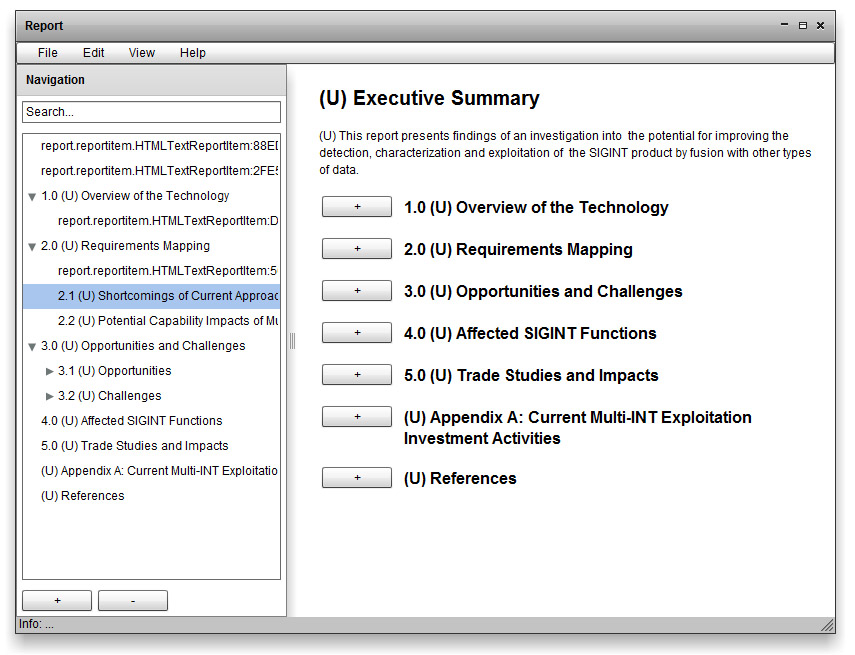
  • Pretty much stealing the design from Microsoft Word’s navigation layout.  Here’s what it looks like so far:
  • The widget takes in a hierarchical configuration object.  A node in hierarchy receives one of the rollupcontainers in the report and the navigation pane on the left is actually pointing directly at the configuration object.
  • Next I’m going to try adding in the ability to click items in the tree and have the report navigate to that spot
  • Then simple editing like removing / moving items around in the tree

Mike 1.19.2011

  • Finished entering in data for the sample report
  • Continued putting the framework together by adding in the module loading code and creating an example application that loads a module and creates instances of the classes loaded

Mike 1.18.2011

  • Working on porting all of my sandbox and other segregated code in to several mavenized projects that are shared on SVN and making example apps for parts of the code:
    • Started with the basic ones stuff, the logging screens, config loading, and data handling stuff
    • Added styles and skinning code + example app
  • Got an email from Alan with new report data, working on hardcoding that in to a quad chart prototype

Mike 1.10.2011

  • Made it so one CollapsibleContainer may container other CollapsibleContainers to form something like a tree
  • Working on a quad layout
    • It equally divides up any container to give the first 4 elements 1/4 of the space
    • Any elements over 4 are ignored and left above the rest in the z-order
    • Users may ‘focus’ one quadrants which will resize that element to fill the container and bring it on top of the other elements
    • unfocusing the element puts it back in its original place
  • Now need to make something resembling a report in a quad chart, may need to come up with some way to roll-up information so unfocused quadrants display some kind of reasonable summary