Monthly Archives: January 2013

Phil 1.22.13

8:00 – 4:30 ESSO

  • Backups
  • Deployed new PA. There are some logic issues WRT Due, Overdue and Current. Wrote them all out, but Dong has them, so I can’t enter them yet.
  • Printed out the Cognos query and results so that we have something to work with to produce the charts for Col. Dukes.
  • Spent a bit of time discussing my travails and thoughts about JDeveloper and JavaScript
  • OK, this book gets ridiculously good reviews on Amazon. Getting the Kindle edition.
  • Holy crap!
    • One of the most powerful and most controversial parts of the < script > element is its ability to include JavaScript files from outside domains. Much like an < img > element, the < script > element’s src attribute may be set to a full URL that exists outside the domain on which the HTML page exists, as in this example:
  • In XHTML (and XML), CDATA sections are used to indicate areas of the document that contain free-form text not intended to be parsed.
  • Aptana Studio 3? Downloaded. Interesting.
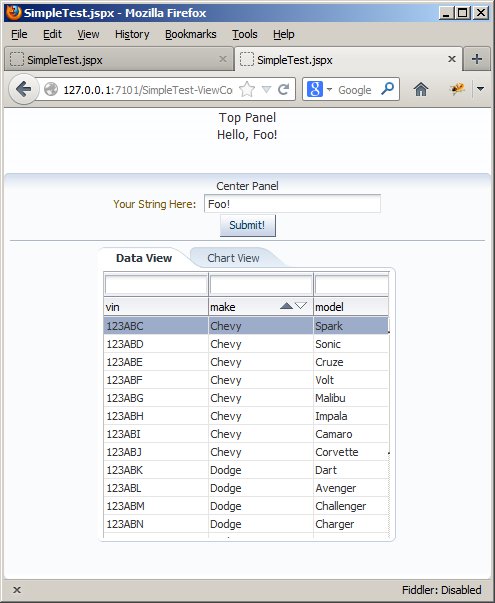
Phil 1.18.12

8:00 – 4:00 – ESSO

Dong Shin 01.18.13

  • cancelled deploy of PA due to SQL error – fixed
  • updated Java 7 and XAMPP 1.7.7 of I&T and production servers
    • max_allowed_packet in my.ini file under mysql should be set to 100M
    • tried to update MySQL 5.2.28 by replacing the folder – didn’t work, may need to figure out the way to update

Phil 1.17.13

8:00 – 4:00 ESSO

  • Meeting with Chris, Lenny, Carla and Tom(?). Started out by discussing fixes, but became a session discussing how to make the new Financial Assistant. Over the next week, the Pit Crew will put together a spreadsheet that contains everything that they need to make a new entry in a table define by a budget center. Adding a line is essentially adding a MIPR (kind of). Adding a new line, can duplicate some or all of the previous line. Adding a MIPR addendum, for example, would duplicate the entire line except for obligation, outlay, and date. This data all goes back into the existing tables in the database. 
  • One modification of the current bugs/requests – make it so contract information in the finding request dropdown maps only to the associated MIPR.
  • Updated the servers with monitoring software and also updated their listings.
  • Made sure that the VISIBILITY code works for Dimitri’s visit.
  • Dimitri came by and we walked through an FP demo,  most of the VISIBILITY data visualization piece, hitting a lot of tangents along the way. He thinks he might find it useful.
  • And I need to update my database. visibility_scripting is out of date and there is no alerts DB.

Dong Shin 01.17.2013

  • status meeting at 8
    • discussion about new spreadsheet format
  • few bugs/enhancements
    • When contracts dialog comes up, limit the contracts to project related contracts in PA
    • Remove Incomplete status in PA
    • When committed == 0, auto fill current months (via script?) in PA
    • fix incorrect fiscal month in PA
    • Duplicating projects should have a checkbox for each of the following to appear in a dialog before the action
      • Budget Center line
      • Associated funding requests
    • Funding Requests should have a field that points back to the source project (UID, Project ID, etc.)
  • fixed the incorrect fiscal month in PA
  • removed Incomplete status and associated changes(!)
  • added projects to retrieve related contracts for invoices

Phil 1.16.13

8:30 – 4:30 ESSO

  • Backed up (another slow login day)
  • Deployed new version of PA
  • Working on ADF.
    • Fails to load page, which is pretty much the same problem as before: javax.el.PropertyNotFoundException
    • Wow. The problem was that I changed the default java compiler from the 1.6 U24 that Jdeveloper ships with to 1.7 U11, which is the current version. Impressive how an Oracle product broke an Oracle product
  • Nonetheless, progress:

progress

OH

  • And it looks like we’re not free of our FGM entanglements yet. Self evaluations. Woo freaking hoo.
  • Sent Lynn a note about my reimbursement as well, along with my final grades. Maybe some progress?

Phil 1.15.12

8:00 – 10:00 ESSO

  • The production server wasn’t accessible for some reason today. Tomcat was running, and if I went to 127.0.0.1 on the server, things came up just fine. Fixed by restarting the server. Weird.
  • Backups
  • A really useful  blog with some tips and code snippets which you may undoubtedly need while coding in ADF.

10:00 – 2:30 OH

  • Visit with Samir Nanavati to discuss feldman project. Nice meeting. *Terrible* traffic. It took 90 minutes to get to Tysons, and about 70 minutes to get back, for an 11:00 meeting. Oh yeah, and there was no one manning the full service booth on the toll road on the way back, so being a nice little drone, I paid by calling the posted number (FastPass). $1.00 toll, $6.00 handling charge. Then, after they took my money, they forwarded me to the toll road authority so that I could complain about the absence of a worker. I was then told that I should have run the toll. Awesome.

2:30 – 5:00 ESSO

  • Tried to follow along with the ADF videos, but the components aren’t there. Well, they are kind of there, but have changed since the video was made. As a result, I made some progress, and can build things that look kind of reasonable, but they are not launchable. Don’t know why. So, I’m going to flail at something new tomorrow: ADF Hello World Tutorial

Phil 1.14.13

  • Doctor appt this morning. The leg is totally fine.

10:00 – 3:00 ESSO

  • Talked to Dong some about the Due/Overdue/Incomplete/Complete project status 
  • Installing new Java. Need to do this at home, too.
  • To change the default Java library in JDeveloper, do the following
    • Application->Default Project Properties. The “Default Project Properties” dialog opens
    • Select Libraries and Classpath in the tree navigator on the left
    • Click on the change button at the top right The “Edit Java SE Definition” dialog opens
    • Click the “”Browse”” button after the “Java SE Executable:” field on the top right.
    • Navigate to your new “java.exe” (e.g.. C:Program FilesJavajdk1.7.0_11bin)
  • Note that this only changes the settings to new projects. To change the settings to an existing project, right click on the project in Application Navigator, click on “Libraries and Classpath”, and follow the steps above.
  • Watching the next video. This one is on ADF faces
  • Programmatic ADF. And some more code snippets.

3:00 – 5:00

  • Q1 Team get together

Phil 1.11.13

7:30 – 4:30 ESSO

  • Logging in was sloooooooooooooooooooooooow today.
  • Meeting with Chris B. Lenny and Tangie weren’t there, and Carla was busy, so it was just Dong, Chris and I. The main new thing was the idea of putting in a new field into the project line item (at the bottom of the project overview screen) that would have the identifier (possibly a script?) that tells the scripting system what item to look for in its query of COGNOS.  That and a few bugs were added to the list of req’s. Also, I mentioned to Chris that we were starting on FA, and that it would not be Flash-based.
  • Backups
  • Deployed new PPM and PA
  • Onward with Step 3: Explore the Starter Application
  • Walked through FSMs with Dong. PA is getting complex in spots…
  • ADF developer YouTube channel

FP

  • Moved the Phantom over to the testbed a(new firewire cable and USB mux) and verified that the tactor project is compiling and running. Yay!

Dong Shin 01.11.2013

  • meeting at Fort @ 7:30AM
    • Uniques ID# (String) to identify MIPR/Budget center for updating COGNOS/FACT data – discussion later
  • deployed new PA and PPM, few more bugs
    • Reported Outlay shows up in Summary in PPM
    • Current Month not correct in PPM
  • continue working on Financial Data Navigator

Phil 1.10.13

8:00 – 4:00 ESSO

  • Backups and meetings.
  • We need to figure out a way to get around the need to “double click” to get to a cell after filling out a form.
  • Found a better set of tutorials: Charting with ADF Data Visualization Components
    • Part 1: Validating the Model and Starting Building the UI
    • Nope, can’t get connected to the DB to make a schema, so I’m screwed. Error message from Ant is:
      • C:JDeveloperFOD_11InfrastructureDBSchemabuild.xml:28: java.sql.SQLException: Listener refused the connection with the following error:
        ORA-12505, TNS:listener does not currently know of SID given in connect descriptor. Checking the error message leads here. Going to poke at that after lunch.
      • Following the link above, I was able to determine what the SID(?) jdbc was attempting to connect to. This can be done in a couple of ways:
        • Go to C:oraclexeapporacleproduct11.2.0servernetworkADMIN and view tnsnames.ora. It’s a text file. The file contains (in my case) three “definitions” of connections. In my case, the one labeled “XE” had my machine (WHITEOAK) listed as the host and a port (1521). That appeared to be the way to connect to the DB.
        • The above can also be done by typing “lsnrctl services” at the command line. in this case, it shows an instance called “xe”. HOST is WHITEOAK, though the port is different (49170)
        • I verified that xe was visible using “tnsping xe” on the command line. That looked promising, so I adjusted the build.properties (jdbc.sid =) to reflect that. And now that I go back and read the tutorial, it does indeed say that this value can either be orcl or xe. Woohoo!
      • Part 2: Starting Using Graphic Components
      • Part 3: Adding Other Complex Graphical Presentations to the Page
      • Part 4: Using the Thematic Map Component
    • On a separate note, it might be nice to put in the Feed Tem Social plugin and bring in interesting content related to our coding tavailes. Need to talk to Dong about that tomorrow.

Dong Shin 01.10.2013

  • working on adding “DUE” status to individual projects
  • PA defaults to “Reporting Months” on CURRENT and DUE status
  • continue working on “DUE” status for list of projects in PA – done!
    • modified the query to get status
      • SELECT p.*, IF(p.uid IN (SELECT project_id FROM (SELECT project_id, year, year_count, count(funding_id) as data_count FROM obligations_outlays WHERE ((ISNULL(month_1) OR ISNULL(month_2)) AND (year+year_count-1) = 2013) OR ((ISNULL(month_1) OR ISNULL(month_2) OR ISNULL(month_3) OR ISNULL(month_4) OR ISNULL(month_5) OR ISNULL(month_6) OR ISNULL(month_7) OR ISNULL(month_8) OR ISNULL(month_9) OR ISNULL(month_10) OR ISNULL(month_11) OR ISNULL(month_12)) AND (year+year_count-1) < 2013) GROUP BY funding_id, year, year_count ) AS FOO WHERE data_count = 6), ‘OVERDUE’, IF(p.uid IN (SELECT project_id FROM (SELECT project_id, year, year_count, count(funding_id) as data_count FROM obligations_outlays WHERE ((ISNULL(month_1) OR ISNULL(month_2)) AND (year+year_count-1) = 2013) OR ((ISNULL(month_1) OR ISNULL(month_2) OR ISNULL(month_3) OR ISNULL(month_4) OR ISNULL(month_5) OR ISNULL(month_6) OR ISNULL(month_7) OR ISNULL(month_8) OR ISNULL(month_9) OR ISNULL(month_10) OR ISNULL(month_11) OR ISNULL(month_12)) AND (year+year_count-1) < 2013) GROUP BY funding_id, year, year_count ) AS FOO WHERE data_count < 6), ‘INCOMPLETE’, IF(p.uid IN (SELECT project_id FROM (SELECT project_id, year, year_count, count(funding_id) as data_count FROM obligations_outlays WHERE (ISNULL(month_3) AND (year+year_count-1) = 2013) GROUP BY funding_id, year, year_count ) AS FOO WHERE data_count > 1), ‘DUE’, ‘CURRENT’) ) ) as status FROM projects p WHERE p.uid in (SELECT project_id FROM budget_centers)