
8:00 – 4:00 FP
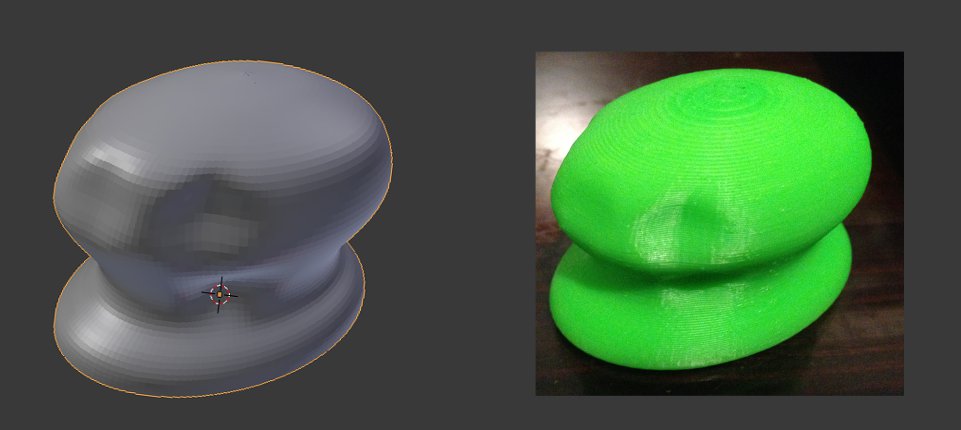
- Was able to successfully print out the mouse yesterday. It printed “solid” in that it had structure on the inside to allow the piece not to collapse. I also wound up printing it at about 1/3 scale so that it only took an hour to print as opposed to six. Still, I’m pretty happy with the result. Below is the Blender version on the left and the MakerBot printout on the right:

- Set up an account with Shapeways so that I can print out a more substantial model. And so that I don’t have to sit around for six hours waiting for something to print. Along the way, I learned why my mouse model was solid. You need to generate inner and outer walls and connect them. The printer doesn’t know how to handle printing two sides of a two-dimensional plane. This is controlled in Blender by detecting ‘Non-Manifold’ surfaces. If you find them, that means that the normals in that area are behaving oddly, and need to be fixed. Maya had a ‘clean up option, but blender doesn’t. Still working on how to completely fix a surface, though I do have it to the point what it looks pretty reasonable. We’ll see if Shapeways accepts it.
- It was accepted, but came out as the wrong size. Trying to scale it now. Well, that seemed to work.
- It’s now in the printing queue, and should be here by the 22nd!
- Found the problem with the shape. There were edges *inside* the original shape that I rotated that were confusing the calculation of the normals. Next, time – delete those before rotating.
- Made a fixed version and uploaded it to Shapeways.
- Filled out AMPERE paperwork.
- Make some dice. Done!

 viztales