Monthly Archives: February 2011

Mike 2.14.2011

Worked with Phil to resolve getStrackTrace() calls in our code which were apparently breaking the non-debug version of flash player.

  • Commenting out the violating lines fixed the issue
  • So I then put in put in some conditional compilation flags as defined here
  • And magically even with the debug flags on, the code ran in the non-debug flash player, so by adding lines of code that in theory do nothing, we fixed the problem
  • Reworked the about page to add information about the debug flags and the user’s version of flash player

While playing with database accessing code, I found out how to build a Flex + Java Dynamic Web Project in Eclipse which builds and deploys both the java and flex code all in one swoop.  It also allows debugging of both sides in the same instance of eclipse.  Here are the VERY specific requirements:

  • Install Galileo Eclipse IDE for Java EE Developers (Newer versions of eclipse will produce an error later on)
  • Install the Flash Builder 4 Eclipse plug-in, make sure to pick the Eclipse plug-in from the drop-down list
  • The plug-in is installed with Eclipse Ganymede (too old for what we want to do, and who ships a plug-in with the whole framework anyway?), so we have to tell out Galileo install where the plug-in is:
    • Navigate to your plug-in install directory (‘C:Program FilesAdobeAdobe Flash Builder 4 Plug-in’ which I’ll call PLUG-IN)
    • Copy the file ‘PLUG-IN/eclipse-host-distro/dropins/com.adobe.flexbuilder.feature.core.nl1.link’
    • Paste a copy in to GALILEO-INSTALL/dropins
    • All this file contains is one line pointing to the plug-in install directory
  • Now if you run your Galileo Eclipse, you should be able to open the ‘Flash’ perspective from Window > Open Perspective > Other…
  • Now that the installs are done we can make a project… go to the ‘Flash’ perspective and create a new Flex project, fill in the fields something like this:
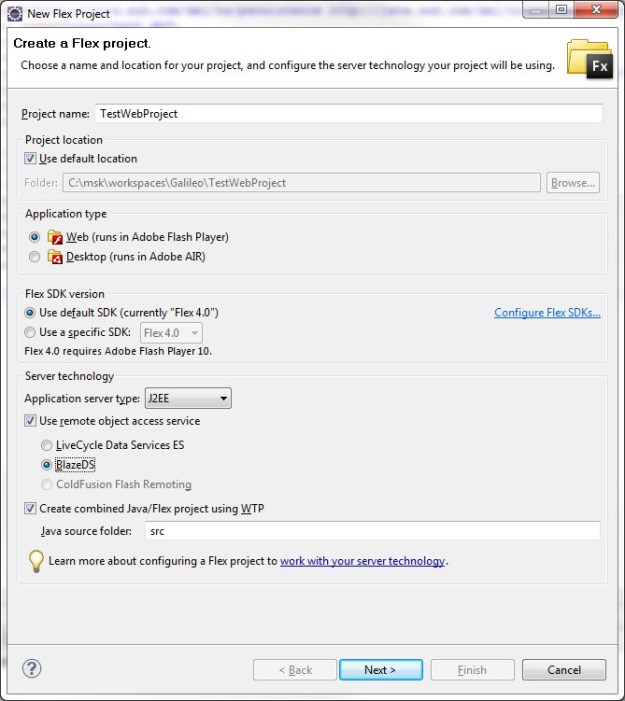
  • If you do not see the bottom lines “Create combined Java/Flex Project..” something was not installed or configured correctly in the beginning steps.
  • Click next, here you will configure your server, if you do not have a J2EE server configured, click new and make one, it is fairly straight forward, you simply choose your tomcat version and point to the main tomcat directory
  • You will also need a blazeds.war file which can be downloaded from Adobe here, the binary distro is all you need but there are very nice examples in the full distro
  • After you’re done with this page, click next to configure your flex project, the only line you need fill in is on the bottom ‘Output folder URL’.  If your project is called ‘TestWebProject’ this would look something like ‘http://localhost:8080/TestWebProject’
  • Click finish, if you get an error here which won’t let you finish the project, it may be because your eclipse version is too new… yea, this won’t work any eclipse version other than Galileo as mentioned earlier
  • Next we need to change one thing in the .flexproperties file.    Initially the server’s context root is not set properly after the project has been created. To change this either open the properties of the Flex project ADCDemo, select Flex Server and change the context root to /ADCDemo or change the serverContextRoot property in the file .flexProperties. To do this open the file .flexProperties in Flex Builder (you can find it in the Flex Navigator view in the root folder of the ADCDemo project) and change the property serverContextRoot to the context root of the Web application (“/ADCDemo”). Replace
    serverContextRoot="/WebContent"

    with

    serverContextRoot="/TestWebProject"
  • Now open the ‘Servers’ view from Windows > Open View… (Server > Servers), and add your project to your server by right-clicking on the server and choosing ‘Add and Remove’:
  • Start the server, then run your flex app and you should get a very blank flex app running in your browser
  • From here you can edit Flex code in the Flex perspective and your java code in the Java perspective (I highly recommended switching perspectives as the directory structure appears to change between perspectives)
  • The usual flex remoting files are contained in ‘WebContent/WEB-INF/flex’ and anything in your java src folder will be placed in to ‘WebContent/WEB-INF/classes’ folder during the build so things like log4j.properties go there

Phil 2.14.11

7:30 – 5:30 VISIBILITY

  • Found a problem with Flash Player dealing with debug statements. It’s covered here, but the gist of it is that the non-debug version of Flash Player seems to choke on debug statements – at least Error.getStackTrace() (not sure about trace().
  • Adding Randomized ANOVA to stats package. It turns out that CMM is trying to have a measure of confidence in their presentation of data but they don’t have a good statistical basis for making the call. How convenient 🙂
  • Testing Dong’s new PPM and hopefully burning a disk.
  • Had a grand time figuring out what’s up with flash debuggering.
  • Added the following to the FGMUtils pom file to get our compiler flags in. It looks like this:

<plugin>
<groupId>org.sonatype.flexmojos</groupId>
<artifactId>flexmojos-maven-plugin</artifactId>
<version>3.8</version>
<extensions>true</extensions>
<dependencies>
<dependency>
<groupId>com.adobe.flex</groupId>
<artifactId>compiler</artifactId>
<version>4.0.0.14159</version>
<scope>compile</scope>
<type>pom</type>
</dependency>
</dependencies>
<configuration>
<definesDeclaration>
<!–  this is the command line: define=CONFIG::debugging,true -define=CONFIG::release,false –>
<property>
<name>CONFIG::debugging</name>
<value>true</value>
</property>
<property>
<name>CONFIG::release</name>
<value>false</value>
</property>
</definesDeclaration>

</configuration>
</plugin>

Dong Shin 02.14.2011

  • FGMDEV backup still not behaving
    • created a separate script that dumps database an hour before the ftp transfer….
  • PPM Changes
    • added Export testing button for Project Mgmt Panel for Beta only….
    • added email, phone/fax to MIPR Request Form
    • uploaded the latest PPM for release/testing to /exhange/PPM_021411
    • working on email request generator
      • created data_requests table
      • created _data_requests_projects table
      • created _data_requests_users table
      • set up relations between tables

Tom.DeVito 2.10.2011

Voice coil actuators:

  • These are really cool but really expensive.
  • They can output up 300lbs of peak force with a continuous force for 100lbs.
  • They are very responsive and maybe good for feedback if they weren’t so expensive because even if it wasn’t powerful enough to push your finger you would still feel the force.

Other Options:

  • Looked into some other type of speakers.  Surface transducers can turn any surface into a speaker.  The problem with these is that they are too big.
  • There are little speakers that are found in computer cases that I want to see if they will work.

Repairing the hand:

  • I am not usually one to personify inanimate objects but I’m pretty sure the index strain gauge connection hates me.
  • For whatever reason the glue was not drying quickly today.
  • Attached wires to terminal pad but not SG because glue wouldn’t dry quickly.

Dong Shin 02.11.2011

  • PPM Changes
    • Working on data email generator
    • Working on a sandbox app to save datagrid data to excel file – donefla
    • added a test button to Project Mgmt to test exporting – works!
    • added ExportUtils to EdgeUitls
    • deployed com.as3xls.as3xls:1.0:swc to FGMDEV Nexus
      • <dependency>
        <groupId>com.as3xls</groupId>
        <artifactId>as3xls</artifactId>
        <version>1.0</version>
        <type>swc</type>
        </dependency>
  • Flash running at the site is v10.0

Phil 2.11.11

7:30 – 3:00 VISIBILITY

  • It looks like the customer uses Flash 10. Not sure about the exact version.
  • Interview with Phillip Tomlin.
  • Sank into a Friday stupor and was unable to get anything substantial working.

Dong Shin 02.10.2011

  • while searching for ways to save PPM data into excel format, found
  • PPM Changes
    • saving database changes to DBUpdateSQLs02102011.sql
    • Funding Request Changes
      • larger mailing address POC
      • added email and phone/fax for mailing address POC
      • two more fields to funding_requests table – mailing_address_email and mailing_address_phone
        • ALTER TABLE `funding_requests` ADD `mailing_address_email` VARCHAR( 255 ) CHARACTER SET utf8 COLLATE utf8_general_ci NULL DEFAULT NULL AFTER `mailing_address` ,
          ADD `mailing_address_phone` VARCHAR( 255 ) CHARACTER SET utf8 COLLATE utf8_general_ci NULL DEFAULT NULL AFTER `mailing_address_email`
      • removed Contracts from Reimbursable
      • Add Contract added to Direct Cite window
      • added a new field to contracts table
        • ALTER TABLE `contracts` ADD `ACRN` VARCHAR( 255 ) CHARACTER SET utf8 COLLATE utf8_general_ci NULL DEFAULT NULL AFTER `contract_number`
      • remove all, but FY and Budget Center in BudgetCentersWindow for Financial Status
    • working on a pivot query to return financial data for selected project, month, year
      • find all first month data for year 2011 from projects and obligations_outlays tables
        SELECT year, project_id, year_count,
        GROUP_CONCAT(IF(type=’Planned Obligated $:’, month_1, NULL)) AS ‘Planned Obligated $:’,
        GROUP_CONCAT(IF(type=’Reported Actual Obligated $:’, month_1, NULL)) AS ‘Reported Actual Obligated $:’,
        GROUP_CONCAT(IF(type=’Planned Outlay $:’, month_1, NULL)) AS ‘Planned Outlay $:’,
        GROUP_CONCAT(IF(type=’Reported Outlay $:’, month_1, NULL)) AS ‘Reported Outlay $:’,
        GROUP_CONCAT(IF(type=’PM Actuals Outlay $:’, month_1, NULL)) AS ‘PM Actuals Outlay $:’,
        GROUP_CONCAT(IF(type=’Outlay $ (Reported in FACTS)’, month_1, NULL)) AS ‘Outlay $ (Reported in FACTS)’,
        p.*
        FROM obligations_outlays o, projects p
        WHERE year = 2011 AND year_count = 1 AND o.project_id = p.uid
        GROUP BY year_count, year, project_id
        ORDER BY project_id, year

Phil 2.10.11

7:30 – 5:30 VISIBILITY

  • Downloaded Dong’s update on my home machine, but my CD drive just died, and I can’t burn the thing.
  • Good meeting with Trish and Lea(?). The bug fixes appear to be working. We spend some time on small features, and how the email generation should work. Dong has my notes right now, but I’ll add detail later.
  • Meeting with Anne and the CMM folks. Went very well. We’re going to get together again to discuss in more dtail. The possibility appears to be that CMM would like to incorporate VISIBILITY, possibly by sending a RESTful request to the server containing the table to display. We, on the other hand would like to run a set of queries against the CMM data to have more data for VISIBILITY reports. I think we can have both, which might maker everyone very happy.
  • Generalizing the data input, and adding another test to the statistics package. As an aside, CMM is attempting to develop confidence intervals on the data they provide to their users. Hmmm.

Phil 2.9.11

7:30 – 6:30 VISIBILITY

  • Installed new version of PPM. Everything seems to be working, though the meeting to walk through was postponed until tomorrow. The Combobutton is still in
  • Worked on actionscript statistics classes.
    • Completed the Randomized Test
    • Updated the data sources to take user data as well as generating random

Tom.DeVito 2.9.2011

Repairing the hand:

  • Index finger is still not acting right.  Tried replacing the bottom just to get exactly the same resistance as before which is equal to the other working ones.
  • Replaced top one again.  Still 100 ohms too high.  Think this might be due to a groove in the metal.
  • Smoothed out the metal and put insulating layer on it.

Computer Controlled Amplifier:

  • Came across this website listing various amplifiers:  http://www.datasheetcatalog.com/function/Analog_and_Mixed-Signal_Devices/Signal_amplification/Audio_amplifiers.shtml
  • The one that looks good for our purposes is:  1 W BTL audio amplifier with digital volume control TDA8551
  • This IC is controlled by a trinary input(3 signals)
  • High signal is between 4.2-5 volts
  • Float signal is between 1-3.4 volts
  • Low signal is between 0-.6 volts
  • I was able to get these 3 signals using the i2c rheostats we have in combination with 500 ohms of resistance.  The power from the i2c adapter is connected to b1 with 500 ohms resistance and then w1 is connected to ground.  The voltage is divided at b1 so the signal is between Vdd and b1.
  • The mode is also controlled by a trinary input so one i2c rheostat chip(which has 2 rheostats in it) will control 1 amplifier using the two rheostats for each input.
  • We can only have 4 of these on one i2c bus so the fifth finger will need another usb-i2c adapter.

Calculating R2 for voltage divider:

R_2 =  frac{R_1}  {({frac{V_mathrm{in}}{V_mathrm{out}}-1})}
R1 = 500 ohm
Vin = 5
Vout = x (desired output voltage)

Christine 02.09.2011

  • Deleted and re-checked out EdgeUtils2 only to have the same errors occur. Met with Dong:
    • More maven fun, this time on the mac. Discovered flexmojos:flexbuilder not working correctly for library apps (ex: EdgeUtils)
  • Installed MySQL on Windows machine; got Tomcat working in Eclipse on both Mac and Windows.

Tom.DeVito 2.8.2011

Repairing the hand:

  • Index finger still has problems.  Found out it was actually the bottom, not the top, that had the wrong resistance.  Attached a new one waiting for glue to dry.

I2C volume control:

  • Found out the difference between a rheostat and a potentiometer.  A rheostat only has 2 leads while a potentiometer has 3.  The potentiometer changes the resistances between the wiper and both ends producing two different resistances which add up to the total.   All potentiometers can act as rheostats but rheostats can’t act as potentiometers.
  • Our i2c chips are rheostats which is a problem because our amplifier needs a potentiometer.  I was able to mimic a potentiometer by setting the second register to (255 – register1).  This worked but there is no way to cut off the sound completely.  The chip has a shutdown command but it shuts it down at A which doesn’t exist on these circuits.
  • There is a version of this chip which is a potentiometer and the cut off switch would work but these are not addressable.  To use these I would either need a usb hub or some type of i2c multiplexer which I am still confused how you actually address it.
  • The other option is to get a complete audio amplifier IC.  Finding one of these that is not tiny and has leads is hard.
  • Going to read documentation for the ad5243 to see if there is a special way to mute it.   Have a feeling only the potentiometer version can do this.

Mike 2.8.2011

Working on the back-end database and java interface.  After going through a lot of documentation and partial examples, I figured out a way to dynamically map java HashMaps of key value pairs to a hibernate managed database.  I did it by using the dynamic mapping capability of Hibernate.  Hibernate simply requires an xml document to map keys to database columns.  I plan on creating a meta class structure that will either store object meta information or read it straight from the database tables and create the required xml documents as required.  If a new property is added to a dynamic object, the meta class will generate a new xml document for Hibernate and hibernate takes care of the SQL ALTER calls.

Reasons why this is good:

  • We can make use of dynamic Flex objects
  • Our object types can evolve and grow with time and be transferred between instances
  • We can connect to almost any database type (all types supported by hibernate) without rewriting anything
  • We can make use of libraries made to work with hibernate for things like lazy loading and data pagination
  • We don’t have to write sql queries for most things (if a Car has an Owner and we have a reference to the Car object, calling car.getOwner() will cause hibernate to do the database call for us)

Dong Shin 02.08.2011

  • PPM Changes
    • created SelectContractWindow that has filtering/searching capabilities, mapped to Funding Request
    • consolidated many buttons in ProjectMgmtPanel into PopUpButton
      • disabled click, works like ComboBox
    • added support to view Project Status from Main menu
    • fixed Start / End date validation
  • FGMDEV backup
    • dump files still not getting to the server
    • created and configured second script to transfer that runs one hour after the first one – check tomorrow.