
Worked with Phil to resolve getStrackTrace() calls in our code which were apparently breaking the non-debug version of flash player.
- Commenting out the violating lines fixed the issue
- So I then put in put in some conditional compilation flags as defined here
- And magically even with the debug flags on, the code ran in the non-debug flash player, so by adding lines of code that in theory do nothing, we fixed the problem
- Reworked the about page to add information about the debug flags and the user’s version of flash player
While playing with database accessing code, I found out how to build a Flex + Java Dynamic Web Project in Eclipse which builds and deploys both the java and flex code all in one swoop. It also allows debugging of both sides in the same instance of eclipse. Here are the VERY specific requirements:
- Install Galileo Eclipse IDE for Java EE Developers (Newer versions of eclipse will produce an error later on)
- Install the Flash Builder 4 Eclipse plug-in, make sure to pick the Eclipse plug-in from the drop-down list
- The plug-in is installed with Eclipse Ganymede (too old for what we want to do, and who ships a plug-in with the whole framework anyway?), so we have to tell out Galileo install where the plug-in is:
- Navigate to your plug-in install directory (‘C:Program FilesAdobeAdobe Flash Builder 4 Plug-in’ which I’ll call PLUG-IN)
- Copy the file ‘PLUG-IN/eclipse-host-distro/dropins/com.adobe.flexbuilder.feature.core.nl1.link’
- Paste a copy in to GALILEO-INSTALL/dropins
- All this file contains is one line pointing to the plug-in install directory
- Now if you run your Galileo Eclipse, you should be able to open the ‘Flash’ perspective from Window > Open Perspective > Other…
- Now that the installs are done we can make a project… go to the ‘Flash’ perspective and create a new Flex project, fill in the fields something like this:
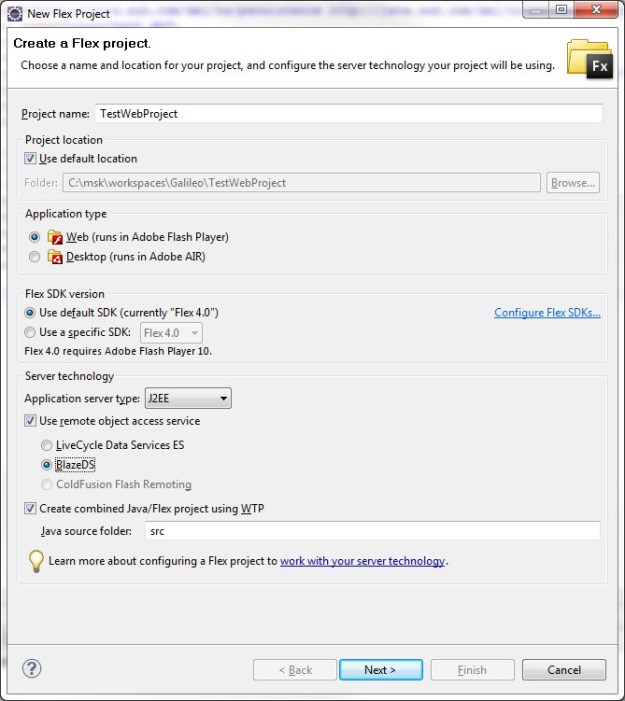
- If you do not see the bottom lines “Create combined Java/Flex Project..” something was not installed or configured correctly in the beginning steps.
- Click next, here you will configure your server, if you do not have a J2EE server configured, click new and make one, it is fairly straight forward, you simply choose your tomcat version and point to the main tomcat directory
- You will also need a blazeds.war file which can be downloaded from Adobe here, the binary distro is all you need but there are very nice examples in the full distro
- After you’re done with this page, click next to configure your flex project, the only line you need fill in is on the bottom ‘Output folder URL’. If your project is called ‘TestWebProject’ this would look something like ‘http://localhost:8080/TestWebProject’
- Click finish, if you get an error here which won’t let you finish the project, it may be because your eclipse version is too new… yea, this won’t work any eclipse version other than Galileo as mentioned earlier
- Next we need to change one thing in the .flexproperties file. Initially the server’s context root is not set properly after the project has been created. To change this either open the properties of the Flex project ADCDemo, select Flex Server and change the context root to
/ADCDemoor change theserverContextRootproperty in the file .flexProperties. To do this open the file .flexProperties in Flex Builder (you can find it in the Flex Navigator view in the root folder of the ADCDemo project) and change the propertyserverContextRootto the context root of the Web application (“/ADCDemo”). ReplaceserverContextRoot="/WebContent"with
serverContextRoot="/TestWebProject" - Now open the ‘Servers’ view from Windows > Open View… (Server > Servers), and add your project to your server by right-clicking on the server and choosing ‘Add and Remove’:


- Start the server, then run your flex app and you should get a very blank flex app running in your browser
- From here you can edit Flex code in the Flex perspective and your java code in the Java perspective (I highly recommended switching perspectives as the directory structure appears to change between perspectives)
- The usual flex remoting files are contained in ‘WebContent/WEB-INF/flex’ and anything in your java src folder will be placed in to ‘WebContent/WEB-INF/classes’ folder during the build so things like log4j.properties go there


 viztales